LOOKPORT / TICKETING & EVENT BUDGETING
UK organisers: Model ticketing fees with Lookport's 6% calculator
UK organisers: model commission, card fees, VAT, royalties and fixed costs to calculate net ticket proceeds. Try Lookport's calculators and its 6% commission.

Organisers need to budget for four fee types: platform commission, payment-processing charges, VAT and royalty obligations where they apply, and fixed per-ticket or per-order costs. The single modelling step is straightforward: gross ticket price minus commission, processing fees, tax and royalty deductions, and fixed costs equals net proceeds per ticket. Platforms vary in how they structure this. Lookport, for example, charges a flat 6% commission with proceeds paid directly into the organiser’s own Stripe account.
TL;DR:
- Platform commission generally accounts for the largest fee, often quoted as a percentage or fixed amount per ticket or order, affecting net proceeds accordingly.
- Payment-processing fees vary based on card type, with international and premium cards incurring higher percentage rates and additional costs for cross-border transactions and currency conversions.
- Proper budgeting requires estimating all non-optional fees, including VAT and royalties on gross receipts, and testing different apportionment methods for fixed costs like postage.
- Using templates or built-in calculators helps validate assumptions, especially for complex fee structures and multiple ticket tiers, ensuring accurate break-even analysis.
- Ensuring compliance with UK regulations involves including all mandatory fees in advertised prices and clearly explaining those fees that cannot be calculated upfront.
Table of Contents
- Breakdown of organiser-facing ticketing fees and how they are typically charged
- How to model fees into ticket price, revenue and break-even calculations
- Payment processors: headline fees, variability and how to budget for cards
- Regulatory, tax and royalty considerations for your budget
- Practical templates and tools for your ticketing budget
- Setting your final ticket price: a quick checklist
- How Lookport can simplify fee modelling
- Sources
- FAQ
Breakdown of organiser-facing ticketing fees and how they are typically charged
Platform commission is the fee a ticketing provider takes for hosting your sale, usually a percentage of the ticket price. Some platforms charge this per ticket, others per order, and the difference matters once you are selling in volume. Booking, handling and fulfilment fees sit alongside commission and cover the mechanics of getting a ticket to a buyer, whether that is a printed stub posted out or a digital pass issued instantly.
Payment-processing fees are separate again. These typically combine a percentage of the transaction with a fixed pence amount, charged by the processor rather than the ticketing platform itself. Fixed per-order costs, such as postage or manifesting, tend to apply once per transaction rather than once per ticket, so a group buying four tickets in one order pays that cost once, not four times.
A few points to keep straight when budgeting:
- Platform commission is usually the largest single line and can be charged per ticket or per order.
- Payment-processing fees are set by the processor, not the ticketing platform, and combine a percentage with a fixed amount.
- Fixed order costs like postage apply once per transaction, so apportionment across tickets needs a clear rule.
- Optional buyer-facing extras, such as insurance or premium delivery, are add-ons organisers can choose to offer or omit.
A platform charging a slightly higher commission can still be worth it if its marketing tools or audience data measurably improve sell-through. That comparison belongs in your overall budget, not just in the fee line.
How to model fees into ticket price, revenue and break-even calculations
Building a working model starts with the right inputs. You need the gross ticket price, the platform commission rate, the payment-processing rate and its fixed pence component, whether VAT applies, any royalty percentage, fixed costs per ticket, the number of tickets on sale, and an assumption for refunds or chargebacks.
- Set the gross price you intend to advertise, inclusive of all non-optional charges.
- Deduct platform commission as a percentage or fixed amount, per the platform’s model.
- Deduct payment-processing fees, combining the percentage rate with the fixed pence charge per transaction.
- Deduct VAT and royalty obligations where they apply to your event type.
- Subtract fixed per-ticket costs, such as postage or manifesting, apportioned per your chosen rule.
- The result is net proceeds per ticket, which multiplied by tickets sold gives aggregate revenue.
Order-level costs need apportionment: divide a fixed postage charge by the number of tickets in that order, or apply it once to the purchaser rather than spreading it, and test both approaches for sensitivity.
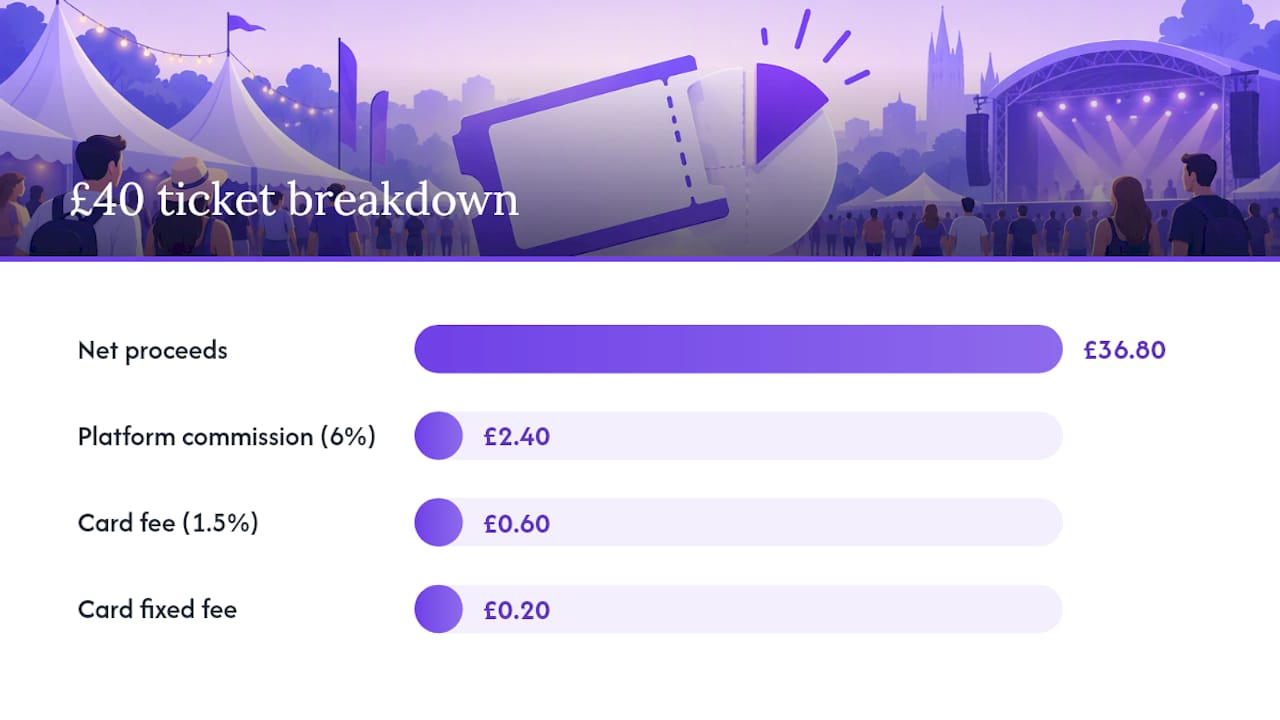
A hypothetical worked example: say a promoter lists hundreds of tickets across three tiers at £25, £40 and £60, in varied quantities. At a 6% platform commission and a payment-processing rate of 1.5% plus 20p per transaction, similar to headline UK card rates published by Stripe, net proceeds per ticket after commission and processing on the £40 tier come to just under £38 before fixed costs and any royalty deduction.
Payment processors: headline fees, variability and how to budget for cards
Payment-processing fees are rarely a flat number. Stripe’s headline UK pricing shows a rate of 1.5% plus 20p for standard domestic cards, with higher rates applying to international or premium cards. Local payment methods and cross-border transactions can carry additional costs, including FX conversion and payout fees, so a blended average is more useful for budgeting than a single headline figure.
- Domestic cards typically sit at the lower end of the processor’s published range.
- International and premium cards carry higher percentage rates.
- Local payment methods and cross-border sales can add FX or payout charges.
- Refunds and chargebacks often incur separate dispute fees that need provisioning.
To build a blended rate, estimate the proportion of sales likely to come from each card type and payment method, then weight the published rates accordingly. Refund and chargeback provisions should sit as a separate line in your model rather than being absorbed into the average processing rate, since dispute fees are charged regardless of the transaction’s original size.
Pro Tip: Run your blended payment-fee estimate against a small early batch of real transactions before locking in your final ticket price.
Regulatory, tax and royalty considerations for your budget
Price transparency rules affect how you present ticket prices before you even get to modelling. Gov requires that quoted prices include all non-optional fees and taxes, and where a fee cannot be calculated in advance, its existence and method of calculation must be stated alongside the price. ASA guidance on ticket pricing reinforces this, and adds that any “from” price advertised must reflect genuine availability and include the cheapest mandatory charge.
VAT treatment depends on the type of event and organisation. HMRC’s VAT Notice 701/47 sets out when admission charges to cultural events may be exempt, and the conditions an organisation must meet to qualify.
Royalty obligations also affect your net figures. The PRS Tariff for live popular music treats many booking and service fees as part of Gross Receipts, with charges typically set at 4% or 4.2% of Gross Receipts, subject to a minimum per event. That means your royalty line is not calculated on the base ticket price alone.
- Price transparency rules require non-optional fees to be included or clearly explained.
- VAT exemption depends on the event type and the organiser’s status.
- PRS royalties apply to Gross Receipts, which can include certain booking fees.
Practical templates and tools for your ticketing budget
Three compact templates cover most organiser needs. A per-ticket net receipt template takes gross price, commission, processing fee and fixed costs, and outputs net proceeds per ticket. An order-level apportionment template handles fixed costs that apply once per transaction rather than per ticket, letting you test different apportionment rules. An event break-even template combines both across your full ticket allocation to show the point at which revenue covers costs.
Validation matters as much as the model itself. Reconcile a handful of sample orders against your actual Stripe payouts to confirm that gross receipts, deducted fees and payout timing match your assumptions, since refund timing and chargeback holds can create short-term discrepancies.
- Per-ticket net receipt template: gross price, commission, processing fee, fixed costs.
- Order-level apportionment template: tests how fixed costs split across multi-ticket orders.
- Event break-even template: aggregates per-ticket figures against total costs to find the break-even point.
Lookport’s ticketing fee calculator and tour break-even calculator implement this same logic. When using them, enter Lookport’s 6% commission as the platform fee input to see how it compares against your current assumptions.
Setting your final ticket price: a quick checklist
Before publishing a price, work through these steps in order.
- Compile fixed and variable costs per ticket, including postage, manifesting and any venue-level charges.
- Add VAT and royalty obligations where they apply, and choose a payment-processing estimate based on your expected card mix.
- Select your platform’s fee model, run a sensitivity check against a ±10% demand swing or a ±1 percentage point fee change, then round your price and document how any non-precalculable fees will be disclosed under CAP and DMCCA rules.
- Check your margin per ticket meets your minimum target, and test a small release before committing your full allocation.
Pro Tip: Release a small batch of tickets first to validate your sell-through assumptions before locking in the price for the remaining allocation.
How Lookport can simplify fee modelling
Modelling multiple nested fees across several platforms takes time that most organisers would rather spend on the show itself. Some platforms charge a flat commission with no other platform charges, and ticket proceeds go directly into the organiser’s own payment account rather than sitting with a third party until payout. Availability follows wherever Stripe itself operates.
Fewer fee layers to track means fewer places for a budget to go wrong. Some platforms offer built-in calculators for per-ticket net receipts and tour break-even modelling using similar formulas, so organisers can test their own numbers directly rather than rebuilding a spreadsheet from scratch.
- Flat commission: 6% with no other Lookport charges.
- Direct payouts: proceeds go straight to your own Stripe account.
- Built-in modelling: fee and break-even calculators ready to use.
| Item | Detail |
|---|---|
| Lookport commission | 6% |
| Other Lookport charges | None |
| Payout destination | Organiser’s own Stripe account |
Try the ticketing page to see how the model fits your event, or open the tour break-even calculator to run your own numbers before you set a final price.
Sources
The rules and rates referenced above come from GOV.UK price transparency guidance, HMRC’s VAT Notice 701/47 (dated September 2011), the PRS Tariff outline, Stripe’s pricing page and ASA ticket pricing guidance (dated April 2026). Check each source directly for updates before finalising your budget.
FAQ
What are ticketing fees explained simply for organisers?
Ticketing fees are the charges deducted from a ticket’s gross price before an organiser receives net proceeds, typically platform commission, payment-processing costs, VAT or royalty deductions where applicable, and fixed per-ticket or per-order costs. Modelling them means subtracting each one from the gross price to find what actually lands in your account.
Why are ticket fees sometimes higher than expected?
Fees stack: a platform’s commission, a separate payment-processing charge, VAT or royalty obligations under the PRS Tariff, and fixed order costs can all apply to the same transaction. Comparing platforms on commission rate alone misses processing fees and fixed costs that affect the final net figure.
How does Lookport’s commission compare to other platforms?
Lookport charges a flat 6% commission with no other Lookport charges, and proceeds are paid directly into the organiser’s own Stripe account. Other platforms may combine commission with separate booking, handling or fulfilment fees, so comparing the full fee structure rather than the headline rate alone gives a truer picture.
Do UK organisers have to include booking fees in the advertised ticket price?
UK guidance requires that quoted prices include all non-optional fees and taxes, or that the existence and method of calculating any fee that cannot be set in advance is clearly stated alongside the price, under GOV.UK price transparency rules. ASA guidance applies the same principle to advertised “from” prices.
How do I estimate payment-processing fees for my budget?
Use a blended rate based on your expected mix of domestic and international cards, since Stripe’s headline UK pricing shows 1.5% plus 20p for standard cards with higher rates for international or premium cards. Add a separate provision for refund and chargeback dispute fees, which are charged independently of the original transaction fee.
Recommended
Ticketing & event budgeting
 2026-10-22
Ticketing Analytics for UK Promoters: What to Track and Why
Ticketing analytics for UK concert promoters: the metrics that drive decisions, how to set up tracking, and how to tie sales data back to your show budget.
 2026-10-21
Concert Break-Even Calculator: How Many Tickets You Must Sell
Work out how many tickets a UK concert needs to break even. Costs, PRS, ticket commission, a worked example and a free calculator for promoters and venues.
 2026-10-19
Ticket Sales Break-Even Analysis for UK Shows
Work out how many tickets you must sell to cover a UK show: VAT, PRS, fees, fixed costs and a worked example, plus a free break-even calculator.
 2026-10-18
Refund Policy for Concerts: What UK Promoters Must Offer
What UK law and industry rules require when a concert is cancelled, moved or the buyer changes their mind, plus how to write a clear refund policy.
 2026-10-15
Facebook Ads for UK Promoters: Track Ticket Sales Before Spend
UK promoters can set up Meta pixel and Conversions API tracking, choose audiences, estimate ticket costs, and link Facebook ad spend to ticket revenue.
 2026-10-14
Profit Margins: Test 10 P&L Lines for UK Concert Promoters
See how UK concert promoters can model profit per show with 10 P&L inputs, test sell through and costs, and check break even before committing a deposit.