LOOKPORT / TICKETING & EVENT BUDGETING
Ticket Sales Break-Even Analysis for UK Shows
Work out how many tickets you must sell to cover a UK show: VAT, PRS, fees, fixed costs and a worked example, plus a free break-even calculator.

A ticket sales break-even analysis tells you how many tickets you must sell before a show stops losing money. The formula is simple: fixed costs divided by the profit each ticket leaves after its own costs. The hard part is getting the inputs right. For a UK promoter that means taking VAT off the ticket price, adding PRS royalties and booking fees, and being honest about the costs you will carry whether 50 or 500 people turn up.
This guide walks through the inputs, a worked example with labelled hypothetical numbers, the checks that stop the result being too optimistic, and what to do when the answer is uncomfortable.
TL;DR
- Break-even tickets = total fixed costs ÷ net contribution per ticket (net ticket price minus every cost that rises with each sale).
- If you are VAT-registered, divide the gross ticket price by 1.2 before you count it as income.
- Include PRS for live popular music, which is 4.2% of box office takings, and any platform or payment fees.
- Compare your break-even figure with capacity. Above roughly 80% of capacity, the show is fragile.
- Test two or three ticket prices before you announce. You can do that in the Lookport tour break-even calculator.
Table of Contents
- The break-even formula for a ticketed show
- The inputs UK promoters most often get wrong
- Worked example: an 800-capacity show
- Check the result before you trust it
- Compare break-even with realistic demand
- Use secondary revenue carefully
- Cancellations, refunds and your break-even
- Setting the model up in the Lookport calculator
- Where Lookport Ticketing fits
- FAQ
- Next step
- Sources
The break-even formula for a ticketed show
Break-even analysis finds the sales volume at which total costs are covered. For a single show, the two parts are:
- Fixed costs: costs that do not change with ticket sales. Artist fee, venue hire, production, insurance, marketing spend, security and staffing are the usual ones.
- Variable costs per ticket: costs that rise with each ticket sold. These are VAT, PRS royalties, booking or platform commission, payment processing and any per-head costs such as wristbands.
The calculation:
- Take the ticket price and remove VAT if you are VAT-registered.
- Subtract the variable costs per ticket. What is left is the net contribution per ticket.
- Divide total fixed costs by that contribution.
- Round up to a whole ticket.
The result is your break-even ticket count. Divide it by capacity to get the break-even occupancy, which is the number most promoters should look at first.
The inputs UK promoters most often get wrong
VAT
The most common error is treating the gross ticket price as income. Live music promoters describe VAT as the big killer for small shows: if you are VAT-registered, 20% of the gross is not yours, and a budget that ignores it can turn a projected profit into a loss. In practice, a £24 ticket is £20.00 of income and £4.00 of VAT.
Whether VAT applies, and whether any reduced rate or relief is available, depends on your registration and the type of event. Check it with your accountant or HMRC before you set prices. We cover the practical side in our guide to VAT on ticket sales for UK organisers.
PRS royalties
If live popular music is performed, PRS for Music applies its Live Popular tariff. One public guide for music groups gives that rate as 4.2% of box office takings. Confirm the current rate and what it is calculated on with PRS before you finalise, because tariff terms can change. For the full cost picture, see our concert budget breakdown.
Ticketing and payment fees
Every ticketing route has a cost, and it belongs in the variable column. With Lookport Ticketing the commission is 6%, with no other Lookport charges, and ticket proceeds go directly into your own Stripe account. Stripe’s own processing charges are set by Stripe, so check its UK pricing page and put the figure you are quoted into your model. Our ticketing fee calculator shows what the commission comes to at different prices and volumes.
Costs people forget
- Backline, rider and hospitality
- Accommodation and travel for the act, if not covered in the fee
- Public liability insurance and event-specific cover
- Licensing, security and first aid
- Printing, signage and paid social
- A contingency line, commonly set as a percentage of fixed costs
Independent artists and small teams planning these lines will find a useful primer on artist financial planning. It helps with setting realistic cost assumptions before you build the model.
Worked example: an 800-capacity show
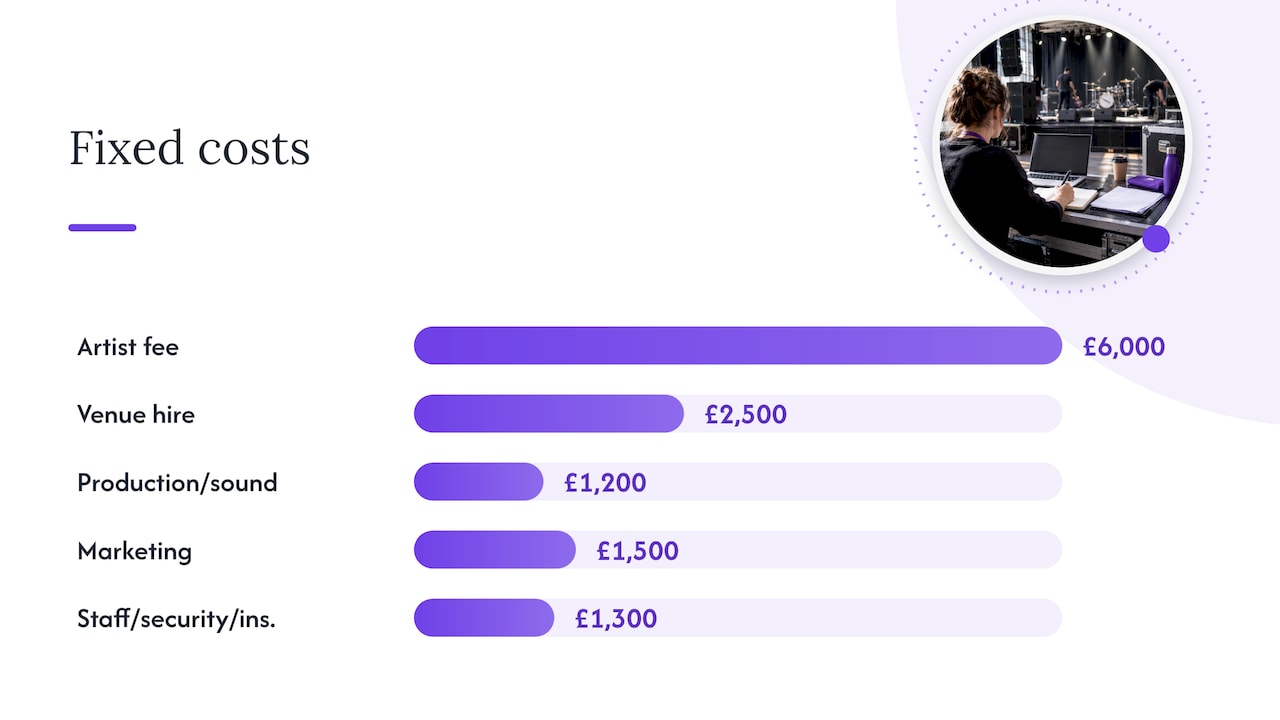
Everything below is hypothetical. The numbers are for illustration only and are not results from any Lookport customer. Replace them with your own quotes.
Fixed costs
| Item | Amount |
|---|---|
| Artist fee | £6,000 |
| Venue hire | £2,500 |
| Production and sound | £1,200 |
| Marketing | £1,500 |
| Staffing, security, insurance | £1,300 |
| Total fixed costs | £12,500 |
Assumptions per ticket (face value £24, VAT-registered)
- Net of VAT: £24 ÷ 1.2 = £20.00
- Ticketing commission at 6% of the £24 face value: £1.44 (check the basis on the pricing page)
- PRS at 4.2% of the £20.00 net: £0.84 (assumed basis, confirm with PRS)
- Payment processing: £0.40 (placeholder, use your Stripe quote)
Net contribution per ticket: £20.00 − £1.44 − £0.84 − £0.40 = £17.32.
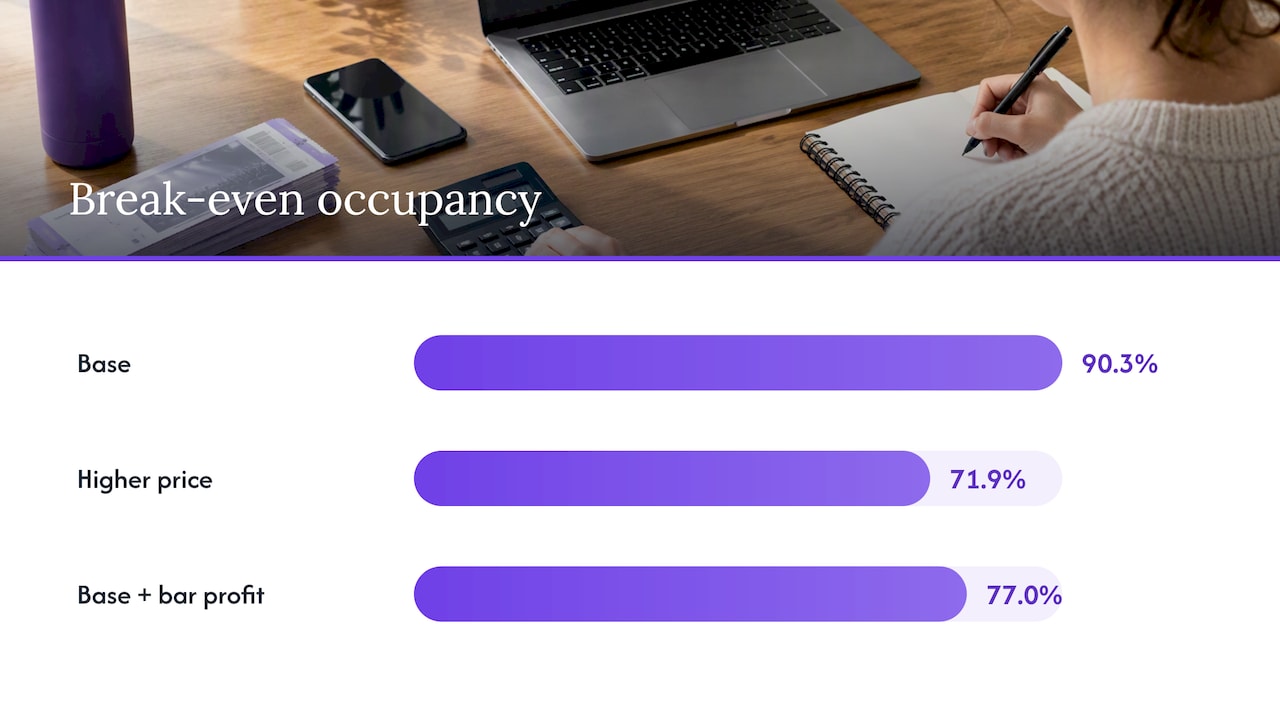
Break-even: £12,500 ÷ £17.32 = 721.7, so 722 tickets. At 800 capacity, that is 90.3% occupancy. One slow week and the show loses money.
Three scenarios side by side
| Scenario | Face value | Net contribution per ticket | Break-even tickets | Occupancy at 800 |
|---|---|---|---|---|
| Base | £24 | £17.32 | 722 | 90.3% |
| Higher price | £30 | £21.75 | 575 | 71.9% |
| Base price plus bar profit of £3 per head | £24 | £20.32 | 616 | 77.0% |
The £30 row uses the same placeholders: £25.00 net, £1.80 commission, £1.05 PRS, £0.40 processing. The bar row adds a hypothetical £3 net profit per attendee after bar costs.
The lesson is not that you should simply raise prices. Price changes also move demand, and a higher price may sell fewer tickets than your model assumes. What the table shows is how much room each lever gives you, so you know what to test.
Check the result before you trust it
A break-even figure is only as good as its inputs. Run these checks before you book anything.
- Quote every fixed cost. Replace estimates with written quotes where you can, and keep a contingency line.
- Reconcile VAT. Confirm your registration status and that the net figure, not the gross, drives every calculation.
- Check the royalty basis. Ask PRS what the tariff applies to for your event.
- Test capacity. Use the real, licensed, sellable capacity, not the venue’s headline number. Sightlines, production positions and holds for guests all reduce it. See how to choose venue capacity when demand is uncertain.
- Stress the price. Rerun the model at the price you would use if sales are weak, not just the price you hope for.
- Account for complimentary tickets. Every guest-list place is a seat that earns nothing.
Compare break-even with realistic demand
Break-even tells you what you need. It does not tell you what you will get. To close that gap, compare the break-even count with evidence of demand: the act’s previous sales in the region, mailing list size, presale numbers and the pace of the first week.
A simple pacing approach:
- Set a target sales curve from announcement to show day.
- Record actual sales at the same checkpoints.
- If you are behind the curve at the checkpoint before your next major cost commitment, decide whether to cut costs, change price, or add marketing, or whether to cancel.
That last decision matters most when deposits are due. Our guides on forecasting ticket sales after the first week and on AI ticket forecasts before deposits explain the inputs and limits. Any forecast, whether a spreadsheet or an AI model, is an estimate built from past data. It can be wrong, and it should be checked against actual sales as they arrive.
Use secondary revenue carefully
Bar, merchandise and sponsorship can lower your break-even point, as the table above shows. Treat them as upside until you have real figures.
The wider market is strong. UK Music reports that music tourists spent an all-time high of £11.2 billion in 2025, up 11.3% on 2024. That figure covers major festivals and concerts and says little about a mid-sized club or theatre show. Your own bar take per head, from previous events, is a better input than any national average.
A safer way to build the model:
- Base break-even on ticket income only.
- Show a second case with secondary revenue added.
- Only commit to costs that the ticket-only case can cover, or that you are willing to risk.
Cancellations, refunds and your break-even
If you cancel or a customer cancels, your income changes. Under UK guidance, a business is generally only entitled to keep an amount that covers its actual losses that result directly from a cancellation. So do not assume deposits or fees are recoverable simply because your terms say so. If your event terms are in doubt, take advice from a solicitor or your local Trading Standards service. Your refund policy should be written before tickets go on sale, and your model should show what happens if you must refund.
Setting the model up in the Lookport calculator
The Lookport tour break-even calculator models costs, ticket prices, revenue and break-even for a show or tour. A practical workflow:
- Enter each fixed cost line for one date.
- Enter ticket price and capacity.
- Add per-ticket costs, including commission and royalties.
- Read the break-even count and occupancy.
- Duplicate the case at two other prices.
- For a tour, repeat for each date, since venue costs and demand differ by city. Our tour budget template helps you check when a tour breaks even before you book.
Save the three cases. When sales data arrives, update the model rather than relying on the version you made before announcement.
Where Lookport Ticketing fits
Once the numbers work, you need a way to sell. Lookport Ticketing charges a 6% commission with no other Lookport charges, and ticket proceeds are paid directly into your own Stripe account. Availability follows Stripe-supported countries. The commission is a simple percentage, so it drops straight into the variable-cost line of your break-even model, and you can see the full terms on the pricing page.
If you are planning marketing around the on-sale, read our short checks on Meta Pixel events before you promote a concert, so you can see which campaigns are driving sales.
FAQ
What is a good break-even occupancy for a concert?
There is no single standard, because it depends on how reliable your demand evidence is. Many promoters aim for a break-even point well below capacity so that a slow sell-through does not cause a loss. If your break-even sits near 90% of capacity, as in the base case above, consider lowering costs or testing a higher price.
Do I include VAT in a ticket sales break-even analysis?
If you are VAT-registered, work from the price net of VAT. At the standard 20% rate that means dividing the gross price by 1.2. Confirm your own status and any relief that may apply with your accountant or HMRC.
How do I include PRS in the calculation?
Treat it as a variable cost per ticket. A public guide gives the Live Popular rate as 4.2% of box office takings, but confirm the current tariff and its basis with PRS for Music for your event.
Can I use break-even analysis for a whole tour?
Yes. Build one model per date, because venue hire, capacity and demand vary, then add shared costs such as transport and crew. A tour can break even overall while individual dates lose money, so review both levels.
Next step
Build your three scenarios in the tour break-even calculator. When the numbers hold up, set up your sales on Lookport Ticketing.
Sources
- How the Money Works in a Small Show, Midnight Mango Learn
- PRS licence cost, Making Music
- Stripe pricing, United Kingdom
- UK Music: music tourist spending reaches £11.2 billion
- Cancelling goods or services, GOV.UK
Recommended
Ticketing & event budgeting
 2026-10-22
Ticketing Analytics for UK Promoters: What to Track and Why
Ticketing analytics for UK concert promoters: the metrics that drive decisions, how to set up tracking, and how to tie sales data back to your show budget.
 2026-10-21
Concert Break-Even Calculator: How Many Tickets You Must Sell
Work out how many tickets a UK concert needs to break even. Costs, PRS, ticket commission, a worked example and a free calculator for promoters and venues.
 2026-10-18
Refund Policy for Concerts: What UK Promoters Must Offer
What UK law and industry rules require when a concert is cancelled, moved or the buyer changes their mind, plus how to write a clear refund policy.
 2026-10-15
Facebook Ads for UK Promoters: Track Ticket Sales Before Spend
UK promoters can set up Meta pixel and Conversions API tracking, choose audiences, estimate ticket costs, and link Facebook ad spend to ticket revenue.
 2026-10-14
Profit Margins: Test 10 P&L Lines for UK Concert Promoters
See how UK concert promoters can model profit per show with 10 P&L inputs, test sell through and costs, and check break even before committing a deposit.
 2026-10-13
AI Audience Analytics: UK Promoters Use the First 72 Hours of Sales
Use the first 72 hours of ticket sales to spot likely return buyers, test consented campaigns, and plan an 8 to 12 week AI analytics rollout for UK promoters.