LOOKPORT / TICKETING & EVENT BUDGETING
Ticketing Analytics for UK Promoters: What to Track and Why
Ticketing analytics for UK concert promoters: the metrics that drive decisions, how to set up tracking, and how to tie sales data back to your show budget.

Ticketing analytics is the practice of turning ticket sales data into decisions: when to spend on marketing, which channel to cut, whether a show will reach break-even. For a UK promoter, the useful version is short. Track sell-through against your break-even point, sales pace, conversion rate by channel and cost per ticket sold. Everything else is a supporting detail.
This guide explains which numbers matter, how to collect them cleanly, where they mislead you, and how to connect them to your show budget.
TL;DR
- Measure outcomes (tickets sold, revenue, cost per ticket by channel), not vanity metrics such as page views.
- Compare sell-through to your break-even ticket count from day one, not to total capacity.
- If your checkout sits on a separate domain, set up cross-domain tracking or your campaigns will not get credit for sales.
- Know which figures are live (inventory, tickets sold) and which are processed (consolidated revenue, attribution) before you act on them.
- Model your costs and break-even first with the tour break-even calculator, then track sales against that target.
Table of Contents
- What ticketing analytics should answer
- The core metrics, and the decision each one supports
- Buyer data: who is buying and when
- Setting up tracking so the numbers are trustworthy
- Live figures versus processed figures
- Attribution: giving credit to the right campaign
- Choosing an event analytics tool
- Where analytics can mislead you
- A weekly routine for a live on-sale
- How Lookport supports this
- FAQ
- Sources
What ticketing analytics should answer
A dashboard is only useful if it settles a decision. Before you open any report, write down the questions you need answered during an on-sale:
- Are we selling fast enough to reach break-even before the show?
- Which channel is producing buyers, and at what cost?
- Where are people dropping out of the purchase journey?
- Who is buying, and where are they from?
- Is it time to change price, release another ticket tier or add a date?
Every metric below maps to one of these. If a number does not change what you do, leave it off the weekly report.
The core metrics, and the decision each one supports
| Metric | How to calculate it | Decision it supports |
|---|---|---|
| Sell-through rate | Tickets sold ÷ capacity on sale × 100 | Whether pricing and marketing are working overall |
| Break-even coverage | Tickets sold ÷ tickets needed to break even × 100 | Whether the show is financially safe yet |
| Sales pace | Tickets sold per day, compared with days left | Whether to add marketing spend or change tactics |
| Conversion rate | Purchases ÷ sessions on your ticket page × 100 | Whether the page, price or checkout is the problem |
| Cost per ticket sold | Channel spend ÷ tickets attributed to that channel | Where to move budget |
| Basket abandonment by channel | Checkouts started but not completed, per source | Whether ad promise and checkout match |
| Buyer geography | Postcode or city of purchasers | Where to aim local ads, or whether to add a date |
Sell-through is not the same as break-even coverage
Sell-through compares sales with capacity. Break-even coverage compares them with the number you actually need. A promoter can be at 55% sell-through and already profitable, or at 80% and still short, depending on the cost base.
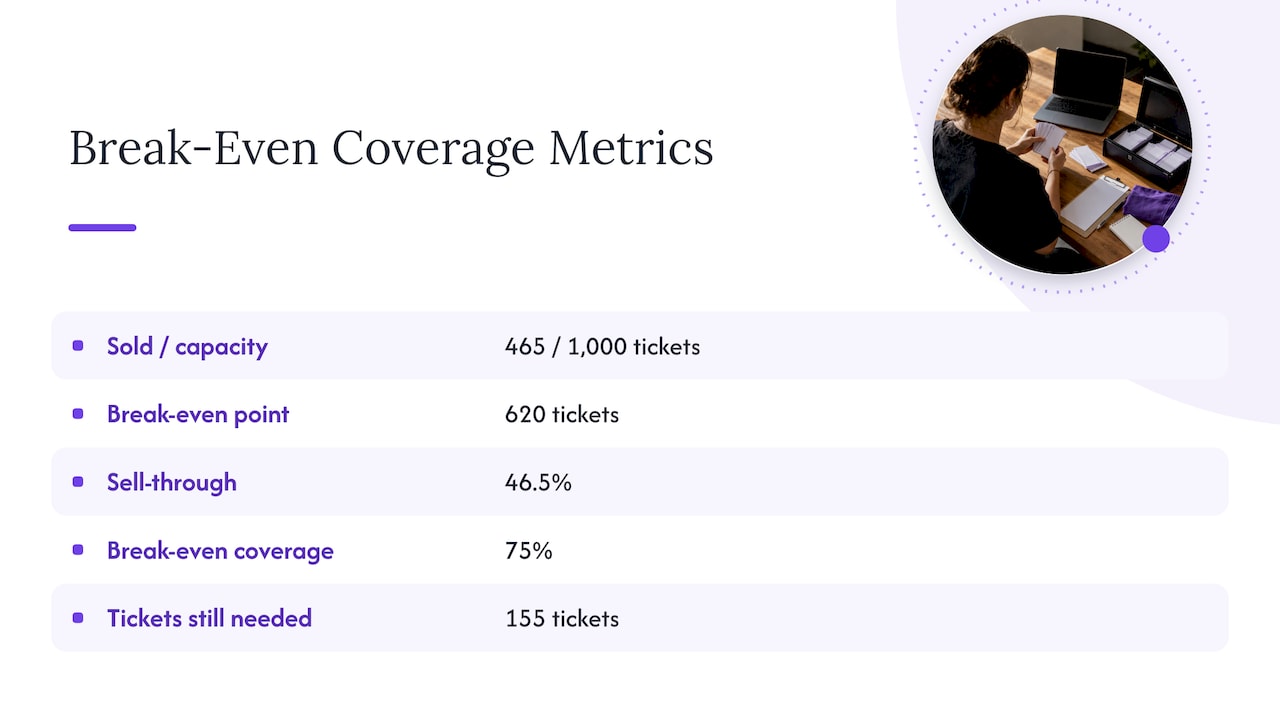
Here is a hypothetical example, for illustration only. A 1,000-capacity room has a break-even point of 620 tickets. At 465 sold, sell-through is 46.5% but break-even coverage is 75%. The second figure tells you how much work remains: 155 tickets. Divide that by the days left and you have the pace you must hold.
To find your own break-even ticket count, build the budget first. Our guides on ticket sales break-even analysis for UK shows and the concert budget breakdown walk through the cost lines, and the tour break-even calculator lets you test costs, ticket prices and revenue together.
Sales pace: read it against a plan, not in isolation
A raw daily sales figure says little. Most on-sales spike at announcement and presale, then settle. What matters is the shape compared with your plan and with similar past shows. If you have the data, set an expected curve before the on-sale opens, then check actuals against it each day. For the method, see how to forecast concert ticket sales after the first week and how UK promoters can use the first 72 hours of sales.
Conversion rate and the vanity metric trap
The most common mistake is confusing activity with results. Practitioner guidance from Eventbrite’s Google Analytics guide for organisers makes the same point: page views flatter you, while conversion rate and customer acquisition cost per channel let you move budget from platforms that underperform to those that sell.
A simple rule: any channel report must end in tickets and pounds, not clicks.
Abandonment tells you about your checkout
Watch the ratio of checkouts started to purchases completed, split by traffic source. If one paid campaign brings plenty of visitors who abandon at payment, the ad and the checkout probably disagree. The usual culprit is a price shown in the ad that is different from the total at checkout once fees are added. The same Eventbrite guide describes this pattern. The fix is not more traffic, it is a clearer price at every step.
Buyer data: who is buying and when
Ticket buying in the UK is becoming less seasonal. viagogo reported that ticket purchases outside the May to September stretch rose by 10% in 2025, and that November and December sales were up 26% on the year before. That is one marketplace’s data, not a measure of every promoter’s audience, but it is a prompt to check your own calendar. If your reports only look at pre-summer spikes, you may be missing gift buyers in the run-up to Christmas.
The wider market is strong too. UK Music data reported by MusicNews puts music tourism at a record £11.2 billion in 2025, with 24.7 million visitors. For a promoter, the practical use is geographic: look at how far your buyers travel, and whether an audience outside your home city justifies targeted spend or a further date.
Useful audience cuts for a single show:
- Buyer location by postcode area, to find ad targeting that is working and areas that are not.
- Ticket type and price tier mix, to see whether lower tiers are cannibalising higher ones.
- Days between purchase and show, to plan late-sales marketing.
- New buyers versus repeat buyers, if your platform links purchases to customer records.
Repeat-buyer data is where analytics pays back across a season. A customer list segmented by past shows is the base for presale and announcement campaigns. Lookport Ticketing includes audience CRM, customer data and campaigns for this, so purchase data stays usable after the show.
Setting up tracking so the numbers are trustworthy
Analytics is only as reliable as its setup. Three checks catch most problems.
1. Track the full purchase journey in GA4
Google Analytics 4 records page views automatically, but it does not know the value of a ticket order unless you tell it. Google’s documentation on conversions and key events explains that purchases need to be set up with the right events, and that value and currency parameters are needed to calculate return on spend. For ticket sales, that means events along the journey: viewing the event, starting checkout and completing the purchase, each with the order value in pounds sterling (GBP) and a transaction ID.
2. Fix cross-domain tracking
Many ticketing pages sit on a different domain from your main website. Without cross-domain tracking, GA4 sees a visitor leave your site and arrive on the ticket page as a new session, so the sale appears to come from your own website instead of the campaign that started the journey. One Further’s guide to Tessitura and GA4 describes this exact issue for arts organisations, and Usercentrics has a clear explanation of cross-domain tracking with Google Tag Manager, including listing domains consistently and testing in DebugView.
Test it yourself: click a campaign link in a private browser window, go through to a test purchase, and confirm the session keeps its original source in your reports.
3. Check your ad platform events
If you buy social ads, the pixel must fire at the same stages. Our short checklist, Meta Pixel events: three checks before promoting your concert, covers the common gaps, and Facebook Ads for concerts shows how to read results against ticket sales.
If you collect analytics data from UK visitors, remember your cookie consent obligations. Check the current rules with the Information Commissioner’s Office before you switch tracking on.
Live figures versus processed figures
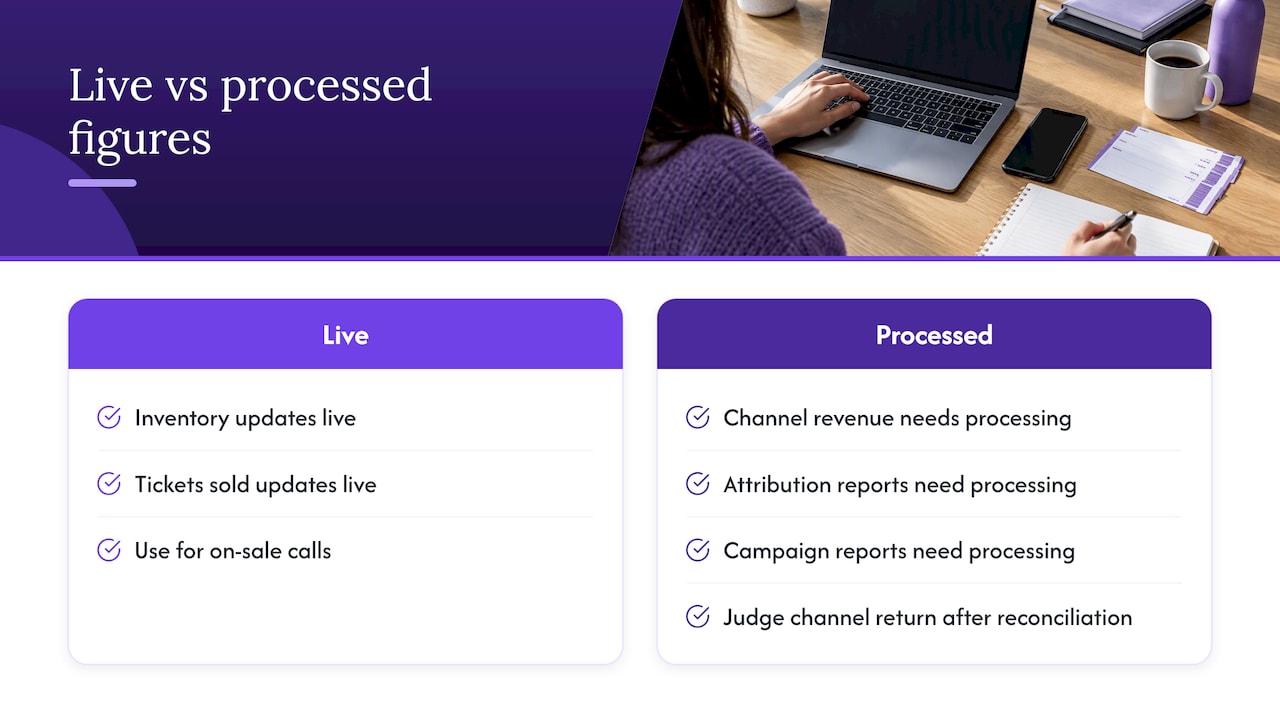
Not every number on a dashboard updates at the same speed. Inventory and tickets sold are usually live. Consolidated revenue across several channels, attribution and campaign reports often need processing. Guidance from Dryfta on event analytics tools warns that relying on processed reports for time-sensitive decisions is a common pitfall that costs sales.
Ask your provider, in writing, which figures are real time and which are delayed, and by how much. For a plain explanation of what a real-time dashboard shows and why the distinction matters, see this guide to real-time sales dashboards. It is written for retail, but the principle carries over to a busy on-sale.
A practical rule for on-sale days: use live sales counts for in-the-moment calls, and wait for reconciled data before judging a channel’s return.
Attribution: giving credit to the right campaign
Attribution answers one question: which activity caused the sale? Last-click reports give credit to the final touchpoint, which is often a brand search or a direct visit. That undervalues the email, the creator post or the paid social ad that started the journey.
A workable approach for a single show:
- Tag every campaign link with consistent UTM parameters (source, medium, campaign).
- Send all links to a ticket page where the tags survive to the order.
- Compare channels on cost per ticket, not cost per click.
- Look at assisted channels too, for example email that precedes a purchase from search.
- Record the result against your budget, so next show’s marketing line starts from evidence.
When you choose tools, experts quoted by Zuddl suggest putting integration depth and revenue attribution above feature counts, and favouring data that flows into your CRM over siloed reports. That is written for B2B events, but it applies to promoters too. A longer walkthrough is in our guide to concert marketing attribution.
Choosing an event analytics tool
You do not need a long shortlist. Compare the types of tool on a few criteria.
| Type | Good for | Limits |
|---|---|---|
| Reports inside your ticketing platform | Sales, ticket types, discount codes, buyer data | May not show marketing spend |
| Web analytics (for example GA4) | Traffic, conversion, campaign sources | Needs careful setup; no view of costs or capacity |
| Ad platform reports | Spend, reach, platform-reported conversions | Each platform counts its own credit |
| Spreadsheet or budget model | Joining spend, sales and break-even | Manual unless fed by exports |
The most reliable set-up combines the first and last: ticket data from your platform, spend from your campaigns, and a budget model that shows break-even. Web analytics then explains why.
Choose on these criteria:
- Can you see sales by ticket tier, channel and day without exporting?
- Does it support the tracking your ad accounts need?
- Can you export data cleanly for your own model?
- Does it make clear what is live and what is delayed?
- Are fees clear? Hidden fees damage conversion, as the abandonment point above shows.
Where analytics can mislead you
- Small samples. A 300-capacity show gives few data points. A single day’s dip means little.
- Forecasts presented as facts. AI and statistical forecasts extrapolate from past patterns. They need good history, and they can be wrong for a new artist or an unusual market. Validate any forecast against shows you already know the outcome of before you trust it with a deposit decision.
- Platform-reported conversions. Ad platforms and your ticketing data rarely match exactly. Treat ticketing orders as the source of truth.
- Ignoring fees. Revenue is not the same as proceeds. Always measure against net proceeds after fees, VAT where it applies and costs.
For a worked, labelled-hypothetical look at forecasting, see AI ticket forecasts for UK promoters and run a sales pacing forecast.
A weekly routine for a live on-sale
Keep the review to 20 minutes:
- Open sales against your break-even coverage and expected pace.
- Check cost per ticket by channel for the week.
- Review abandonment by source and fix any price mismatch.
- Look at buyer location and ticket tier mix.
- Decide one change: move budget, adjust a tier, or add a message.
- Note the decision and the reason in your budget file.
How Lookport supports this
Lookport Ticketing is built for concert promoters and venues. We charge a 6% commission with no other Lookport charges, and ticket proceeds go directly into your own Stripe account. Availability follows Stripe-supported countries. The platform also describes event sales notifications, marketing integrations and audience CRM and customer data. You can see the full detail on the Ticketing page and the pricing page.
Start with the numbers. Put your costs, ticket prices and capacity into the tour break-even calculator, then track your on-sale against the result.
FAQ
What does ticketing analytics include?
It covers sales, revenue, ticket types, buyer location, conversion and the marketing channels that drove purchases. The useful reports connect these to your costs, so you can see profit and break-even rather than sales alone.
Which metrics should a small promoter track first?
Start with tickets sold against break-even, daily sales pace, and cost per ticket by channel. Add conversion rate and abandonment once your tracking is set up correctly.
Is Google Analytics enough for ticket sales?
It is useful for traffic and conversion, but only if purchases are tracked with value and currency, and cross-domain tracking is working if your checkout is on another domain. It does not show capacity or costs, so pair it with your ticketing reports and budget.
How often should I check my ticketing data?
Daily during the first week of an on-sale, when decisions on marketing are most time-sensitive, then weekly. Avoid judging channel returns from live figures alone, as attribution data can lag.
Sources
- How to Sell More Tickets Using Google Analytics (Eventbrite)
- 2025 Year in Live Experiences: UK (viagogo Newsroom)
- UK music tourism reaches record £11.2bn in 2025 (MusicNews)
- Measure conversions and key events (Google for Developers)
- Tessitura and Google Analytics 4: the complete guide (One Further)
- GA4 cross-domain tracking strategy and setup (Usercentrics)
- Cookies and similar technologies (ICO)
- 11 Best Event Analytics Tools for Organizers (Dryfta)
- 10 Best Event Analytics Platforms for B2B Event Teams (Zuddl)
Recommended
Ticketing & event budgeting
 2026-10-21
Concert Break-Even Calculator: How Many Tickets You Must Sell
Work out how many tickets a UK concert needs to break even. Costs, PRS, ticket commission, a worked example and a free calculator for promoters and venues.
 2026-10-19
Ticket Sales Break-Even Analysis for UK Shows
Work out how many tickets you must sell to cover a UK show: VAT, PRS, fees, fixed costs and a worked example, plus a free break-even calculator.
 2026-10-18
Refund Policy for Concerts: What UK Promoters Must Offer
What UK law and industry rules require when a concert is cancelled, moved or the buyer changes their mind, plus how to write a clear refund policy.
 2026-10-15
Facebook Ads for UK Promoters: Track Ticket Sales Before Spend
UK promoters can set up Meta pixel and Conversions API tracking, choose audiences, estimate ticket costs, and link Facebook ad spend to ticket revenue.
 2026-10-14
Profit Margins: Test 10 P&L Lines for UK Concert Promoters
See how UK concert promoters can model profit per show with 10 P&L inputs, test sell through and costs, and check break even before committing a deposit.
 2026-10-13
AI Audience Analytics: UK Promoters Use the First 72 Hours of Sales
Use the first 72 hours of ticket sales to spot likely return buyers, test consented campaigns, and plan an 8 to 12 week AI analytics rollout for UK promoters.