LOOKPORT / TICKETING & EVENT BUDGETING
Run a sales pacing forecast: AI ticketing analytics for concert promoters
Practical guide for concert promoters on AI ticketing analytics. Run a sales pacing forecast, model break-even scenarios, connect Stripe and CRM, and...

AI ticketing analytics give promoters three concrete outcomes: more accurate demand forecasts, better timed pricing decisions, and audience segments you can act on in marketing campaigns. The practical next step is simple: run a sales-pacing forecast on an upcoming show, or model a break-even scenario before you commit to a venue or guarantee.
TL;DR:
- AI ticketing analytics improve demand forecasting accuracy, allowing promoters to adjust pricing and discounts to maximize revenue and fill empty seats.
- Continuous tracking during sales campaigns offers early warning signs of slow-selling shows, enabling timely intervention before final weeks.
- Audience segmentation and lookalike targeting reduce customer acquisition costs and enhance marketing efficiency by focusing on familiar buyer profiles.
- Using data integrations and simple tools like sales pacing and break-even models can enable promoters to implement AI insights with minimal setup time and cost.
- Regular validation through backtesting and monitoring prediction error is essential to avoid forecast failures caused by market shifts or data issues.
Table of Contents
- What AI ticketing analytics do for concerts: measurable benefits and quick wins
- Core AI capabilities promoters should expect: forecasting, dynamic pricing and audience intelligence
- How promoters use analytics in the event workflow: practical steps and KPIs to track
- Implementation checklist: required data, integrations, timeline and expected cost shapes
- Validation, limits and risks: how to test forecasts, common failure modes and compliance responsibilities
- Lookport proof points: how the platform supports promoters
- Three-step getting started plan
- Sources
- FAQ
What AI ticketing analytics do for concerts: measurable benefits and quick wins
Forecasting and pricing tools change specific numbers in your event budget, not just how the data looks on a dashboard. Smarter pricing and better-timed discounts can lift revenue on shows that would otherwise sell at a flat rate throughout the campaign. Filling seats that would sit empty at full price, even at a reduced rate, protects margin rather than losing it entirely.
Manual forecasting eats hours every week during a busy on-sale period, and it tends to catch problems late. Automated tracking flags a slow-selling show against its forecast early enough for you to act, rather than discovering the shortfall in the final week.
Audience segmentation also sharpens marketing spend. Feeding a promoter’s own customer data into ad platforms as lookalike audiences tends to lower the cost of acquiring each buyer and improve return on ad spend, because the targeting starts from people who already resemble past ticket buyers rather than a cold audience.
These outcomes are hypothetical unless tied to your own event data. To measure them properly:
- Compare actual sell-through against your pre-campaign forecast at each checkpoint.
- Track cost per acquisition before and after switching to lookalike or retargeting audiences.
- Record how many discounted tickets sold within the promotional window you set.
The UK live music sector recorded a record £7.6 billion in spend, and rising costs across the grassroots circuit make accurate forecasting and disciplined budgeting more important than optimism when planning a tour.
Core AI capabilities promoters should expect: forecasting, dynamic pricing and audience intelligence
Purpose-built ticketing analytics tend to split into two forecasting modes. Planning mode runs scenario tests before you go on sale, letting you compare pricing tiers or capacity splits against likely demand. Tracking mode updates continuously once tickets go live, comparing actual sell-through against the original plan and revising the end-state forecast as real sales data arrive.
Dynamic pricing tools work from elasticity signals: how sensitive demand is to price at a given point in the campaign. A well-built system suggests price bands and specific actions rather than making changes automatically, and it should include guardrails that protect your relationship with bookers, agents and fans who bought early at a lower price.
Audience intelligence covers a few distinct jobs:
- Segmentation groups buyers by behaviour, spend or location rather than treating every customer the same.
- Propensity scoring estimates how likely a given contact is to buy for a specific show.
- Retention scoring flags which past buyers are drifting away from your mailing list or venue.
- Lookalike audiences extend your existing buyer data into paid advertising platforms.
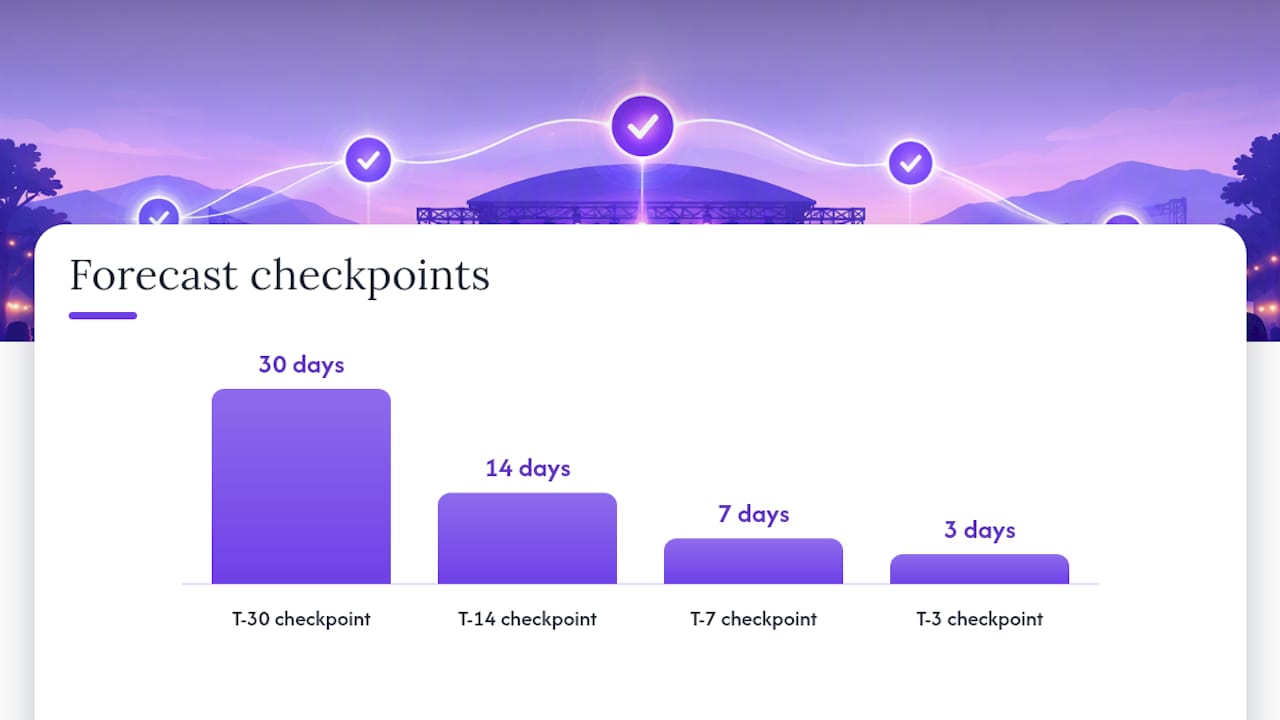
Vendor onboarding for these tools commonly describes forecasting checkpoints in T-30, T-14, T-7 and T-3 windows relative to the event date, which gives promoters a shared language for when to check pacing against plan.
Every forecast carries a margin of error, and a model that reports a wide confidence interval is telling you to treat the number as a range, not a fact. When a prediction sits in that low-confidence territory, the right response is to wait for the next data point or fall back to your own experience with comparable shows, not to act on the midpoint as if it were certain.
How promoters use analytics in the event workflow: practical steps and KPIs to track
Analytics only earn their keep when they are tied to a decision at a specific point in the campaign. A typical event timeline runs from planning through presale, general on-sale, and then a series of checkpoints: T-30, T-14, T-7, and T-3 days before the show, followed by a final-week push.
At each checkpoint, track a consistent set of numbers:
- Sell-through percentage against the forecast for that date.
- Sales velocity, meaning tickets sold per day over the trailing week.
- Channel conversion, comparing how email, social and paid ads each convert to sales.
- Cost per acquisition across your marketing channels.
- Break-even coverage: how close current revenue sits to your fixed and variable costs.
- Margin per ticket once fees and marketing spend are deducted.
This is an example structure, not a guarantee of outcome, and the exact threshold and discount depend on your own show history and margin tolerance.
Pro Tip: Feed each checkpoint’s sell-through figure into your budget calculator so you can see how a pricing or discount change would move your final margin before you commit to it.
Implementation checklist: required data, integrations, timeline and expected cost shapes
Getting AI ticketing analytics running well starts with the data you already hold, not new software. At minimum, gather historical sales by date and channel, event metadata such as capacity, artist and date, CRM fields including email and postcode, and a clear record of ticket types and prices sold.
Integrations matter as much as the data itself:
- Your ticketing platform, since this is the source of live sales figures.
- Stripe or another payment processor, which settles funds and records transaction-level detail.
- Email and CRM tools, which hold the contact data segmentation depends on.
- Ad platforms, so lookalike and retargeting audiences can be built from real buyer data.
- Point-of-sale systems, where ancillary revenue such as merchandise or bar sales needs capturing too.
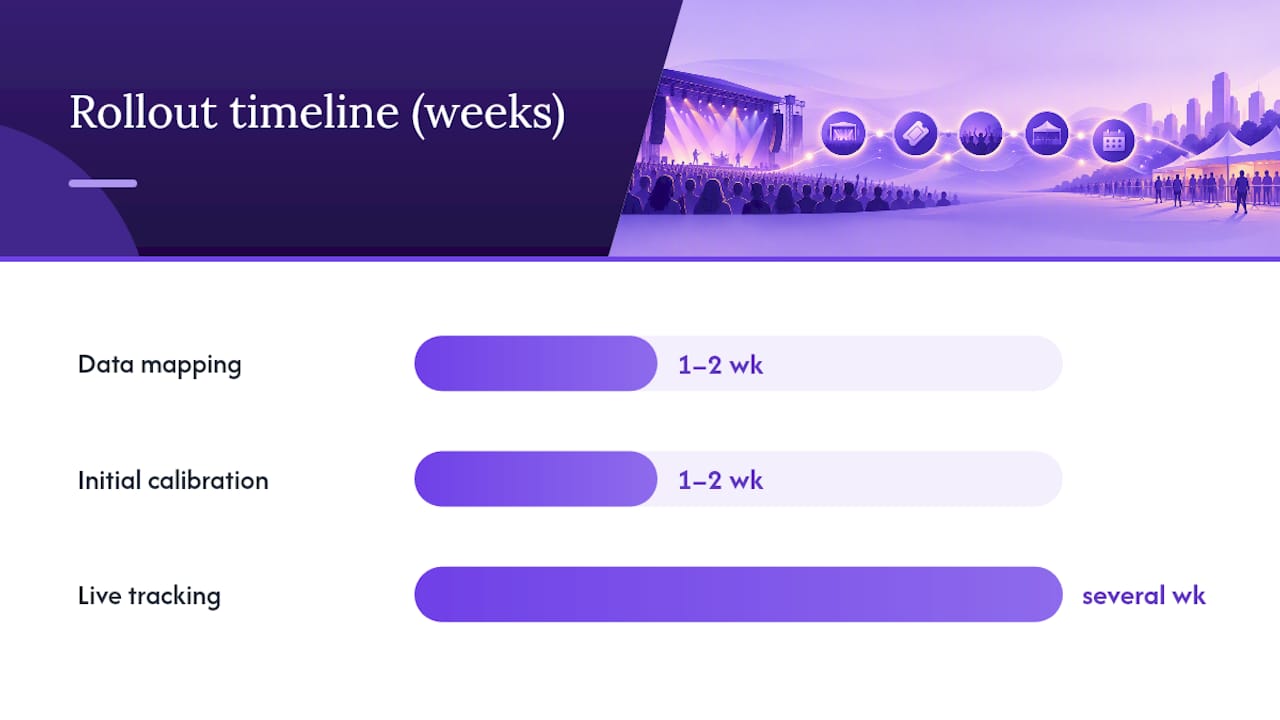
A realistic rollout runs in several phases: data mapping and integration typically takes a week or two, initial calibration against a first event or two takes a similar time, and live tracking with ongoing refinement continues over several weeks as more shows feed the model.
Cost shapes vary by vendor. Some charge a subscription regardless of sales volume, others take a commission per ticket sold. Where a platform states its commission clearly, such as Lookport’s 6% with no other Lookport charges on its ticketing platform, you can model that cost directly against expected revenue. Whichever structure you’re evaluating, run the numbers through a revenue or break-even calculator before committing rather than estimating margin by hand.
Validation, limits and risks: how to test forecasts, common failure modes and compliance responsibilities
Trusting a forecast without testing it first is how promoters get caught out on a slow-selling show. Backtesting against prior events, holding out a sample of past data the model never saw during training, and tracking prediction error over multiple shows are standard ways to judge whether a model’s numbers are worth acting on.
Several failure modes recur across the industry:
- Small-sample artists with little prior sales history give the model too little to work from.
- Sudden news, cancellations or lineup changes can invalidate a forecast overnight.
- Secondary-market activity distorts what primary sales data appears to show.
- Feature leakage, where a model accidentally trains on information it would not have at prediction time, inflates apparent accuracy.
Bias and fairness deserve direct attention. Running disaggregated checks across different audience groups and documenting where each input feature came from helps catch problems before they affect pricing or targeting decisions. Sensitive personal attributes should never be used as direct model inputs.
Organisations should document the lawful basis for each processing operation in the AI lifecycle and keep development activity separate from live deployment.
This principle comes from the ICO’s guidance on AI and data protection, and it applies directly to any promoter using customer data to train or run ticketing models. On the payments side, Stripe’s guide to ticketing and events taxability sets out how tax obligations can vary by territory and sales channel. Speak to a tax adviser about your own situation rather than relying on general guidance alone.
Lookport proof points: how the platform supports promoters
Lookport Ticketing charges a 6% commission with no other Lookport charges, and ticket proceeds go directly into the organiser’s own Stripe account rather than sitting with a third party before payout. That structure means the cost of the platform is transparent from the first ticket sold.
The platform’s AI ticketing feature applies the forecasting and audience intelligence concepts covered above to live sales data, rather than requiring promoters to build spreadsheets by hand. For promoters running events across formats, online and hybrid ticketing support covers both in-person and remote attendance within the same sales flow.
Two Lookport tools map directly onto the workflow described earlier: a sales pacing calculator for tracking sell-through against your forecast at each checkpoint, and the tour break-even calculator for modelling how a pricing or discount decision would move your final margin. Both are available to try against your own event numbers.
Three-step getting started plan
Getting from theory to a working analytics setup takes three concrete steps rather than a long project plan.
- Run a sales-pacing forecast for your next event to see where current sales sit against a realistic trajectory.
- Connect Stripe and your CRM so sales and customer data flow into one place instead of several spreadsheets.
- Model at least two pricing scenarios on the tour break-even calculator before you set your final ticket price.
Set three alerts to check at every checkpoint: your sell-through target, your cost per acquisition ceiling, and your minimum acceptable margin per ticket.
| Step | What it tells you | Where to act |
|---|---|---|
| Sales-pacing forecast | Whether current sales are ahead of or behind plan | Ticket sales pacing calculator |
| Stripe and CRM connection | Where revenue and customer data live in one place | Ticketing platform setup |
| Break-even scenario modelling | Which ticket price and cost combination protects margin | Tour break-even calculator |
Promoters running paid campaigns alongside ticketing analytics may also find it useful to review how AI tools are being applied to content marketing at scale when planning creative for an on-sale push.
Start with Lookport Ticketing to see the commission structure and feature set in full, or go straight to the break-even calculator to model your next show before you set a price.
Sources
- UK live music sector reaches record £7.6bn spend - Access All Areas
- Introduction to ticketing and events taxability | Stripe
- How do we ensure lawfulness in AI? – ICO guidance on AI and data protection
FAQ
Does Ticketmaster use AI?
Large ticketing platforms across the industry have adopted AI for tasks such as demand forecasting and fraud detection, though the specific systems and their inner workings are not fully public. For promoter-facing detail on what a specific platform’s AI does, check that platform’s own documentation rather than general industry claims.
What is the best way to promote a concert?
There is no single best method, but combining audience segmentation with staged marketing triggers tends to outperform a single blanket campaign. Building lookalike audiences from your own past buyer data and timing promotional pushes to specific sales checkpoints, such as T-14 or T-7, gives you a structured way to respond to actual demand rather than guessing.
What is the AI ticketing system?
An AI ticketing system applies forecasting and audience intelligence models to sales data from a ticketing platform, typically covering demand prediction, pricing suggestions and customer segmentation. Lookport’s version of this is documented on its AI ticketing feature page, covering the live capabilities available to promoters using the platform.
How is AI being used in the music industry?
Beyond ticketing, AI is applied across the music industry in areas such as marketing attribution, catalogue recommendation and production tools, though the scope varies widely by company and use case. Within ticketing specifically, the clearest applications are demand forecasting, dynamic pricing support and customer segmentation for marketing.
Recommended
Ticketing & event budgeting
 2026-10-22
Ticketing Analytics for UK Promoters: What to Track and Why
Ticketing analytics for UK concert promoters: the metrics that drive decisions, how to set up tracking, and how to tie sales data back to your show budget.
 2026-10-21
Concert Break-Even Calculator: How Many Tickets You Must Sell
Work out how many tickets a UK concert needs to break even. Costs, PRS, ticket commission, a worked example and a free calculator for promoters and venues.
 2026-10-19
Ticket Sales Break-Even Analysis for UK Shows
Work out how many tickets you must sell to cover a UK show: VAT, PRS, fees, fixed costs and a worked example, plus a free break-even calculator.
 2026-10-18
Refund Policy for Concerts: What UK Promoters Must Offer
What UK law and industry rules require when a concert is cancelled, moved or the buyer changes their mind, plus how to write a clear refund policy.
 2026-10-15
Facebook Ads for UK Promoters: Track Ticket Sales Before Spend
UK promoters can set up Meta pixel and Conversions API tracking, choose audiences, estimate ticket costs, and link Facebook ad spend to ticket revenue.
 2026-10-14
Profit Margins: Test 10 P&L Lines for UK Concert Promoters
See how UK concert promoters can model profit per show with 10 P&L inputs, test sell through and costs, and check break even before committing a deposit.