LOOKPORT / TICKETING & EVENT BUDGETING
AI Ticket Forecasts for UK Promoters: 3 Budget Cases Before Deposits
AI ticket forecasts link sales and timing risks to concert budgets. Build three cases before deposits, then test with Lookport’s tour break even calculator.

Yes: AI forecasting can produce scenario-based ticket-sales projections you can use to set prices and budget cashflows, with insights drawn from AI in music production that highlight the growing role of AI in the music industry. Rather than a single sales number, a good forecast gives you a conservative, target and upside case. Our recommended next step is simple: run an on-sale forecast, then build three budget cases around it before you commit to deposits or guarantees.
TL;DR:
- Prioritize comparable past sales and early on sale velocity; campaign response follows, while social engagement and local context refine forecasts.
- Compare first 72 hours of sales with a similar event; faster velocity may warrant a price tier change, while slower sales call for more marketing.
- Build budgets from conservative, target, and upside forecasts, and schedule deposits and artist guarantees against the conservative case to avoid cash shortfalls if sales lag.
- Check forecasts against only data available at each forecast date, account for demand near the event, and refresh projections as sales accumulate.
- A usable forecast should show cumulative sales over time, sellout or target capacity probability, revenue arrival timing, and confidence bands rather than one estimate.
Table of Contents
- What AI forecasting delivers for concert budgets
- Signal hierarchy: the data inputs that most reliably predict demand
- How to read probabilistic forecasts and their timing risks
- Convert forecasts into price decisions and a three-case budget
- How Lookport’s tools put this workflow into practice
- Try Lookport ticketing or the tour break-even calculator
- FAQ
- Sources
What AI forecasting delivers for concert budgets
A forecasting model does not hand you one fixed figure. It produces a sales curve across the on-sale period, an estimated probability of selling out, and a projection of when money actually lands in your account. Those three outputs map directly onto the budgeting decisions you make every week.
Once you have a curve, you can pace marketing spend against expected demand rather than guessing. You can time deposit payments to promoters, venues or production suppliers against when ticket revenue is likely to arrive rather than when you hope it will. You can also size artist guarantees against a realistic range instead of a best-case assumption.
A forecast worth using should give you:
- A sales curve showing expected cumulative tickets sold by week or day.
- A probability estimate for reaching sell-out or a target capacity.
- A projected timeline for when ticket revenue reaches your account.
- Confidence bands around each of these, not a single point estimate.
Signal hierarchy: the data inputs that most reliably predict demand
Not every data point carries equal weight. Some signals tell you far more about eventual demand than others, and knowing the order matters when you are deciding what to monitor daily versus what to check once.
- Early sales velocity against comparable past events is the strongest predictor available. A peer-reviewed study of sports and entertainment ticket demand found that Bayesian demand learning from early sales, combined with flexible pricing, produced measurable revenue gains over static pricing, with the largest benefits appearing when initial estimates were furthest off.
- Marketing campaign response, including click-through rates, impressions and UTM-tracked conversions, gives you a leading indicator before tickets even sell.
- Social engagement velocity, mailing list open rates and presale registration volumes are useful complements, though they correlate with eventual sales less tightly than direct purchase data.
- Contextual factors such as venue capacity, the local events calendar and weather on the day matter when they genuinely affect a specific show, but they refine a forecast rather than drive it.
Industry reporting on artist and promoter economics has long pointed to the same hierarchy: comparable past ticket sales and early on-sale velocity tend to outperform broader signals like streaming listener counts as predictors of actual ticket demand. The first 72 hours of an on-sale are widely treated as the critical benchmark window: strong early velocity against a comparable show is a far more reliable signal than any single marketing metric taken alone.
How to read probabilistic forecasts and their timing risks
A forecast is only useful if you understand what kind of answer it is actually giving you. Treat every output as a distribution: a conservative case for cashflow planning, a target case for your working budget, and an upside case for decisions like adding a second show or upgrading a venue.
Demand learning models, built on Bayesian updating, work by treating each day of early sales as new evidence that narrows the range of likely outcomes. This is why early sales matter so much: they are not just revenue, they are information that corrects your initial assumptions about how a show will sell.
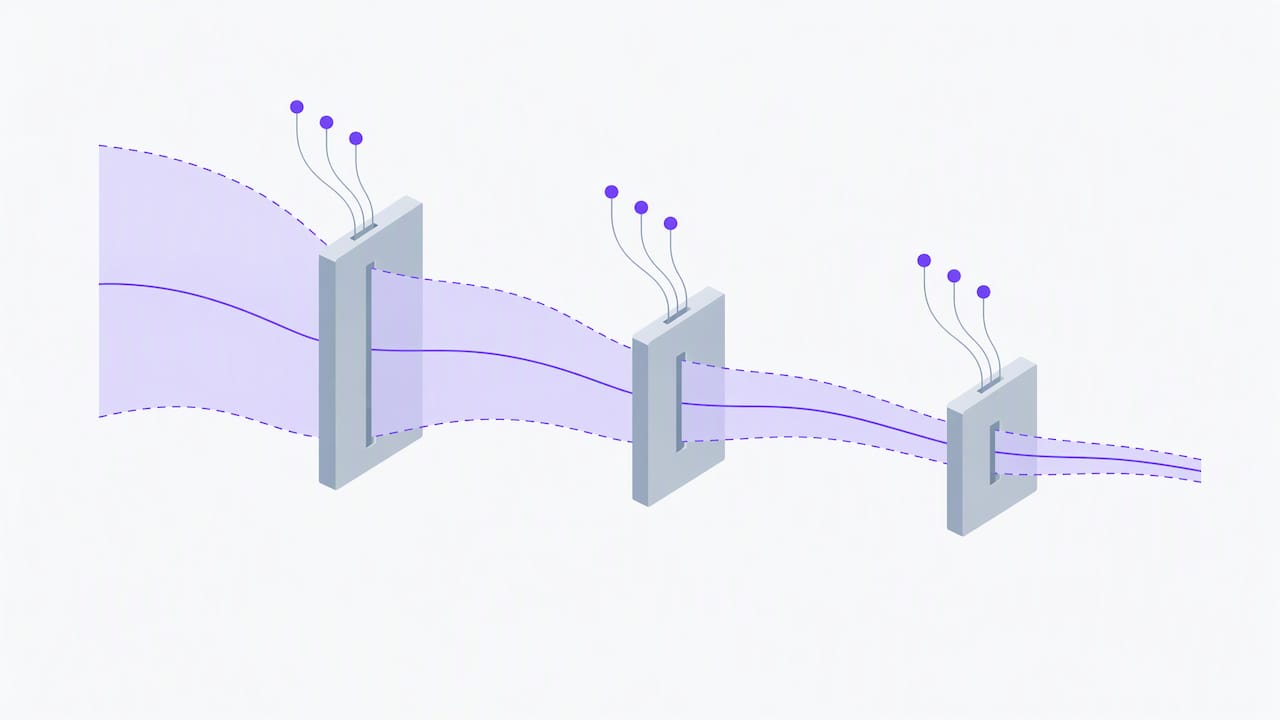
The sharpest risk in this process is timing misspecification: getting the shape of the demand curve wrong even when the total is roughly right. A 2026 modelling study on event ticket pricing found that misspecifying the temporal shape of demand caused a modest average relative revenue loss across simulations, with the costliest cases exceeding one percent. The costliest errors came from models that omitted late-arriving demand entirely, missing surges that occur close to the event date.
Practical checks worth running on any forecast:
- Confirm the model uses time-aware backtesting, meaning it is only validated against data that would have been available at the forecast date.
- Check whether the model’s calibration explicitly accounts for late-arriving demand, not just the overall total.
- Re-run the forecast as new sales data arrives rather than treating the first output as final.
One modelling study found that timing errors, not total-volume errors, caused the most expensive mistakes in event ticket pricing simulations, underlining why a forecast needs regular updates rather than a single run at launch.
Convert forecasts into price decisions and a three-case budget
Turning a forecast into a working budget is a repeatable process, not a one-off calculation. Follow it in order and revisit it as live sales come in.
- Run a pre-sale forecast before tickets go live, using comparable past events and expected marketing reach to set initial price bands and a first conservative, target and upside revenue scenario.
- Treat the first 72 hours as an information-gathering window. Compare actual velocity against your comparable-event benchmark rather than against hope.
- Update the forecast once early data arrives. If velocity is running ahead of the target case, that is your signal to consider a pricing tier change or additional allocation; if it is behind, it is your signal to add marketing spend or hold pricing steady.
- Adjust marketing pacing and ticket allocation according to the updated forecast rather than the original plan, shifting budget towards channels that are converting.
- Rebuild your three budget cases (conservative, target, upside) with the updated numbers and align deposit payments and guarantee instalments to whichever case your cashflow planning requires you to protect against.
Pro Tip: Set your deposit and guarantee payment schedule against the conservative case, not the target case, so a slower-than-expected on-sale never forces an unplanned cashflow gap.
This cycle repeats through the on-sale period. Each update narrows your range and gives you a firmer basis for decisions on marketing spend, allocation and final settlement.
How Lookport’s tools put this workflow into practice
Putting this workflow into practice is easier when your forecasting data and your budget sit in the same place. We built our ticketing platform’s AI analytics to surface sales pacing data directly from live ticket sales, so you can compare early velocity against your own historical events without exporting data elsewhere.
Once you have an on-sale forecast, the practical next step is feeding it into our tour break-even calculator to produce the conservative, target and upside budget cases described above. You can see how each scenario affects your break-even point, your marketing budget headroom and the timing of deposits before you commit.
In practice, this looks like:
- Reading your sales pacing dashboard during the first 72 hours of an on-sale.
- Comparing current velocity to a past comparable event in the same venue or market.
- Entering the resulting conservative, target and upside figures into the break-even calculator to see each scenario’s margin.
Try Lookport ticketing or the tour break-even calculator
Lookport charges a commission on ticket sales, with no other platform charges, and ticket proceeds go directly into your own Stripe account.
If you want to put the workflow in this guide into practice, the fastest starting point is:
- Run an on-sale forecast using your sales pacing data.
- Model a conservative, target and upside case in our tour break-even calculator.
- Set up ticketing for your next show so pacing data and budgeting sit in one place from the first ticket sold.
Whichever show you are planning next, start with the forecast and let the budget follow it rather than the other way round.
FAQ
What is the best event ticketing platform?
The best platform depends on your priorities: fee structure, payout speed, and whether sales data feeds directly into forecasting and budgeting tools. Our ticketing platform features a commission-based fee structure with direct payouts into your own Stripe account, alongside AI sales analytics you can use for forecasting.
Is demand for concert tickets elastic or inelastic?
Ticket demand elasticity varies by artist, genre and market, and no single figure applies across all shows. This is one reason forecasting models rely on comparable past events and early sales velocity rather than a fixed assumption about price sensitivity.
Can AI be used to forecast sales?
Yes: AI demand-learning models use early sales data to update projections throughout an on-sale period. A study of ticket demand in sports and entertainment found that this kind of Bayesian updating, combined with flexible pricing, produced measurable revenue gains over static pricing in tested scenarios, particularly where initial estimates were significantly off.
What’s AI ticket reselling?
AI-driven resale typically refers to automated tools that flag, price or redistribute tickets returned to a secondary market, often using demand signals similar to those used in primary-sale forecasting. This guide focuses on primary-market forecasting and budgeting rather than resale, since the data inputs and goals differ.
Sources
- Dynamic pricing with updated demand for the sports and entertainment ticket industry
- The revenue effect of demand misspecification in event ticket pricing
Recommended
Ticketing & event budgeting
 2026-10-22
Ticketing Analytics for UK Promoters: What to Track and Why
Ticketing analytics for UK concert promoters: the metrics that drive decisions, how to set up tracking, and how to tie sales data back to your show budget.
 2026-10-21
Concert Break-Even Calculator: How Many Tickets You Must Sell
Work out how many tickets a UK concert needs to break even. Costs, PRS, ticket commission, a worked example and a free calculator for promoters and venues.
 2026-10-19
Ticket Sales Break-Even Analysis for UK Shows
Work out how many tickets you must sell to cover a UK show: VAT, PRS, fees, fixed costs and a worked example, plus a free break-even calculator.
 2026-10-18
Refund Policy for Concerts: What UK Promoters Must Offer
What UK law and industry rules require when a concert is cancelled, moved or the buyer changes their mind, plus how to write a clear refund policy.
 2026-10-15
Facebook Ads for UK Promoters: Track Ticket Sales Before Spend
UK promoters can set up Meta pixel and Conversions API tracking, choose audiences, estimate ticket costs, and link Facebook ad spend to ticket revenue.
 2026-10-14
Profit Margins: Test 10 P&L Lines for UK Concert Promoters
See how UK concert promoters can model profit per show with 10 P&L inputs, test sell through and costs, and check break even before committing a deposit.