LOOKPORT / TICKETING & EVENT BUDGETING
Lookalike Audiences for Events: A UK Promoter's Guide
How UK promoters build Meta lookalike audiences from ticket-buyer data: source lists, audience size, UK consent rules, testing and budget checks before launch.
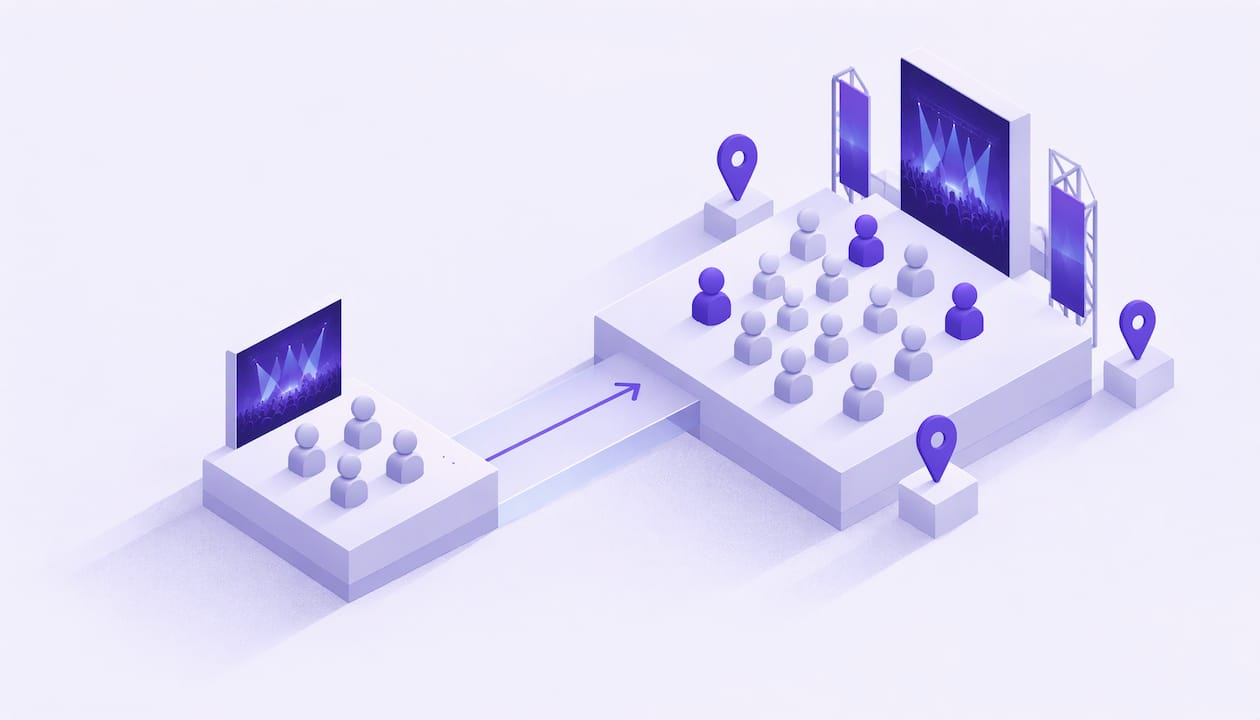
A lookalike audience lets Meta find people who resemble your past ticket buyers and show them your event ads. For a concert or festival promoter, it is a way to reach new buyers without relying only on interest targeting. It works best when the source list is clean, consented and based on real purchases, and when you judge it by cost per ticket sold, not by clicks.
This guide covers which data to use, how to set the audience up, what size and location to choose, what UK data-protection rules apply, and how to tell whether the campaign pays for itself.
TL;DR
- A lookalike audience is built from a source you supply, such as past buyers. Meta then finds similar people in the country you choose.
- Purchase data is the strongest source. Use consented buyer lists and Pixel purchase events, not broad page visitors.
- Meta needs at least 100 matched people in the source. A source of 1,000 to 5,000 generally gives more reliable results.
- Start with a low percentage, such as 1%, and widen only if you need more reach.
- Check consent before you upload any customer list, and set a maximum cost per ticket from your break-even figures before you spend.
Table of Contents
- What a lookalike audience is
- Which audience data to use as a source
- Meta’s requirements and how to set one up
- Choosing audience size and location
- UK data protection and consent
- Timing the campaign around the booking curve
- Measuring whether it works
- Common mistakes to avoid
- Ticketing that feeds your audiences
- FAQ
- Sources
What a lookalike audience is
A lookalike audience is a prospecting audience. You give Meta a source group, such as customers, Pixel events or engaged users. Meta analyses it and finds new people who resemble that group, according to SocialRails’ 2026 guide to Facebook lookalikes.
For an events business, the source group is the important part. If your source is people who bought tickets to your last three shows, Meta is looking for people like them. If your source is everyone who liked a post, Meta is looking for people like casual scrollers. The first group is far closer to your revenue.
A lookalike does not replace your other audiences. It sits at the top of the funnel, finding people who do not yet know you. Warm audiences, such as website visitors and basket abandoners, still do most of the closing work nearer the show date.
Which audience data to use as a source
The quality of the source decides the quality of the lookalike. Rank your options like this, from strongest to weakest.
- Ticket purchasers. Customers who bought and paid. This is the closest signal to what you want more of.
- High-value buyers. VIP, premium or multi-ticket purchasers. A smaller list of buyers who spent more can describe your best audience better than a large list of everyone.
- Repeat attendees. People who bought for more than one show. They show loyalty, which is useful for tours and festival editions.
- Add-to-cart or checkout starters. Useful when purchase volume is low, but weaker, because some of these people never buy.
- Engaged visitors and followers. Use only as a fallback, and keep the list narrow, such as people who watched most of a video or visited a specific event page.
Segment before you upload
One list for every show blurs the signal. A promoter who runs a techno night and a family festival should not feed both buyer lists into one lookalike. Build separate sources by genre, event type or ticket tier. If your ticketing records let you export buyers by event, do that first.
If you sell through a platform that connects to your Meta account, the Pixel and Conversions API can pass purchase events straight into Meta, so the source builds itself. Our ticketing marketing integrations page describes what Lookport currently connects. If you are still setting up tracking, read our three checks for Meta Pixel events before you build any audience on top of it.
Exclude existing buyers
A prospecting campaign should not pay to show ads to people who already hold tickets. Exclude your purchaser list from the lookalike ad set. That keeps the budget on new people and stops existing buyers seeing an ad for a show they have booked.
Meta’s requirements and how to set one up
Meta requires a minimum of 100 matched people in the source audience, and recommends between 1,000 and 5,000 for reliable results, according to Shopify UK’s guide to lookalike audiences. “Matched” matters: if you upload 500 email addresses and Meta can match only 80 to accounts, the source is too small.
The general steps in Ads Manager are:
- Open Audiences and choose Create Audience.
- Select Lookalike Audience.
- Choose your source: a Custom Audience from a customer list, or a Pixel or Conversions API purchase event.
- Choose the location where Meta should look for new people.
- Choose the audience size as a percentage.
- Create the audience and give it time to populate before you attach it to an ad set.
Meta’s menus and eligibility rules change, so confirm the current wording in Meta’s own Ads Manager help before you launch. Name each audience clearly, for example with the show, source and percentage, so you can read results later.
Advantage+ can widen your audience
In 2026, Meta turns on Advantage+ audience by default for Sales, App promotion and Leads objectives. When it is on, an audience you add, including a saved lookalike, is treated as a suggestion that Meta can expand beyond, according to SocialRails. If you want strict control for a test, switch to the original audience options. If you leave Advantage+ on, treat your lookalike as a starting signal and judge the result by ticket sales.
Choosing audience size and location
Meta lets you choose a lookalike size from 1% to 10% of the target country’s population. The smaller the percentage, the more closely the audience matches your source, as Shopify UK explains.
For events, a sensible approach is:
- Start with 1% for your first test. It is the closest match and the smallest pool.
- Move to 2% to 3% if frequency climbs quickly or delivery stalls.
- Treat 5% to 10% as a reach tool for large, general-appeal shows, not a default.
A percentage of the whole of the UK is a large number of people, and most of them live too far from your venue. Live music is a local purchase. A buyer in Inverness is unlikely to travel to a Brighton club night, so a nationwide 1% can waste budget on people who will never attend.
To handle this, use location targeting on the ad set. Pick the country for the lookalike, then narrow the ad set to the cities or radius around the venue that fit your travel pattern. For a tour, create one ad set per date, each limited to the area around that venue, so that you can see cost per ticket by city.
A hypothetical example
The figures below are hypothetical and for illustration only.
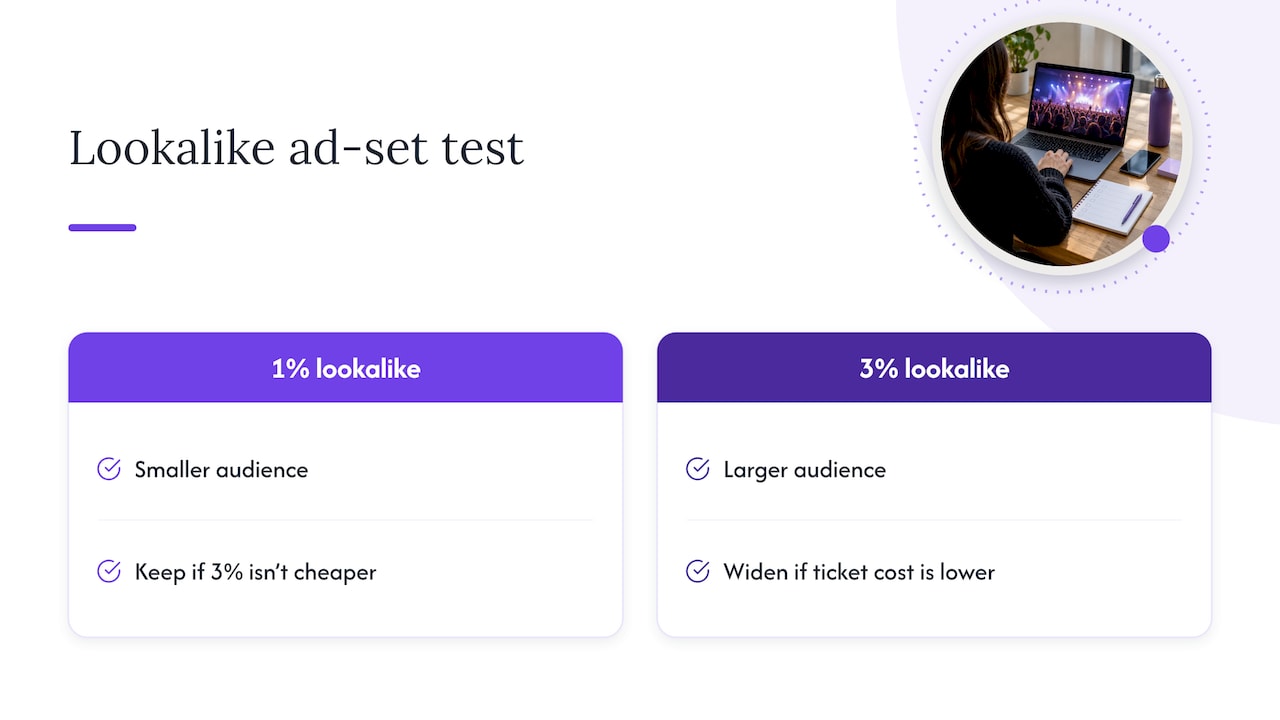
A promoter runs a 900-capacity show. The last two events sold 1,400 tickets in total to around 1,100 distinct buyers who agreed to marketing. The promoter uploads that list, creates a 1% lookalike for the UK, and limits the ad set to a 40-mile radius around the venue. A second ad set uses a 3% lookalike with the same radius. Both get the same daily budget and the same creative for two weeks.
The point of the structure is that only one thing differs between the ad sets: audience size. If the 3% set sells tickets at a lower cost, the promoter widens. If it does not, the promoter keeps the 1% and tests creative instead.
UK data protection and consent
A lookalike built from a customer list uses personal data, so UK data-protection rules apply before you upload anything. This is the part promoters most often skip.
Consent and lawful basis. The ICO says consent is one possible lawful basis, and that consent needs particular consideration where data use is unexpected or particularly intrusive. It also notes that the Privacy and Electronic Communications Regulations commonly require consent for marketing messages, cookies and online tracking. See the ICO’s guidance on when consent is appropriate.
Cookies and the Pixel. Meta Pixel relies on cookies. IAB UK’s guidance says legitimate interests cannot be used to set non-essential cookies, and that consent is a prerequisite where processing depends on them. It also says a legitimate interests approach needs a three-part test covering purpose, necessity and balancing. Read the IAB UK guidance on legitimate interests assessments. In practice, your cookie banner should not fire the Pixel until a visitor has agreed.
Sensitive characteristics. Do not use audience data to infer or target sensitive characteristics. IAB UK’s special category data guidance says inferred special-category data also needs explicit consent. For an events business, that means avoiding source lists or ad targeting built to reveal things such as health, religion or sexual orientation. A queer night, a gospel concert or an accessible-seating promotion can be advertised, but do not build a list that guesses these traits about individuals.
A practical checklist before you upload a list:
- Did the buyers agree to marketing when they bought, and is that record stored with the contact?
- Does your privacy notice say that you use customer data for advertising on platforms such as Meta?
- Have you removed anyone who opted out since?
- Are you uploading only what is needed, such as email address, and not extra fields?
If you are unsure about your lawful basis, ask a data-protection adviser or solicitor, and read the ICO’s own guidance. If you hold buyer records in a CRM, keep consent status as a field, so segmenting by it takes seconds. Our audience CRM and customer data page describes what Lookport currently offers for this.
Timing the campaign around the booking curve
A lookalike audience does not sell tickets alone. When you show it matters as much as who sees it.
Ticket demand tends to follow a curve: an early burst from fans, a quieter middle, then a rise close to the date. Plan the audience work to match.
- On-sale launch. Use your warm lists first: mailing list, past buyers and followers. These people buy fastest and give Meta the first purchase signals.
- Middle weeks. Bring in the lookalike to reach new people. Use awareness and low-commitment actions, such as video views or event page visits, and rotate creative regularly so the audience does not tire of the same ad.
- Final weeks. Shift budget to conversion-focused campaigns and retargeting of website visitors and basket abandoners. Real urgency, such as a genuine capacity limit or a final price tier, works here. Invented scarcity does not, and can breach advertising rules.
There is no fixed day count that suits every show. A 300-capacity club night and a 5,000-capacity outdoor event have different curves. Read your own sales data from previous shows to find where sales rose, and plan from there. Our guide to AI audience analytics in the first 72 hours of sales shows how to read that early pattern, and our Facebook Ads for concerts article covers tracking ticket sales from the ads themselves.
If you sell music rather than tickets, or you are an independent artist planning a first campaign, a Facebook ads playbook for musicians gives a two-week structure for choosing and testing audiences.
Measuring whether it works
Clicks and reach are easy to report and easy to misread. Measure what pays.
The metrics that matter
| Metric | What it tells you | How to read it |
|---|---|---|
| Cost per ticket sold | What each sale costs in ad spend | Compare against your maximum affordable figure |
| Return on ad spend | Ticket revenue per pound of ad spend | Use ticket revenue, not clicks, as the numerator |
| Conversion rate on landing page | Share of visitors who buy | Low rate with high clicks points at the page or price, not the audience |
| Frequency | Average times a person saw the ad | Rising fast means the audience is too small or the creative is stale |
| New versus returning buyers | Whether the lookalike finds new people | Check against your buyer list |
Set your ceiling before you spend
The most useful number is the highest cost per ticket you can afford. Work it out from your show budget: fixed costs, artist fee, venue hire, ticketing fees, and the ticket price. Subtract everything except marketing and you have your marketing headroom. Divide by the number of tickets you still need to sell.
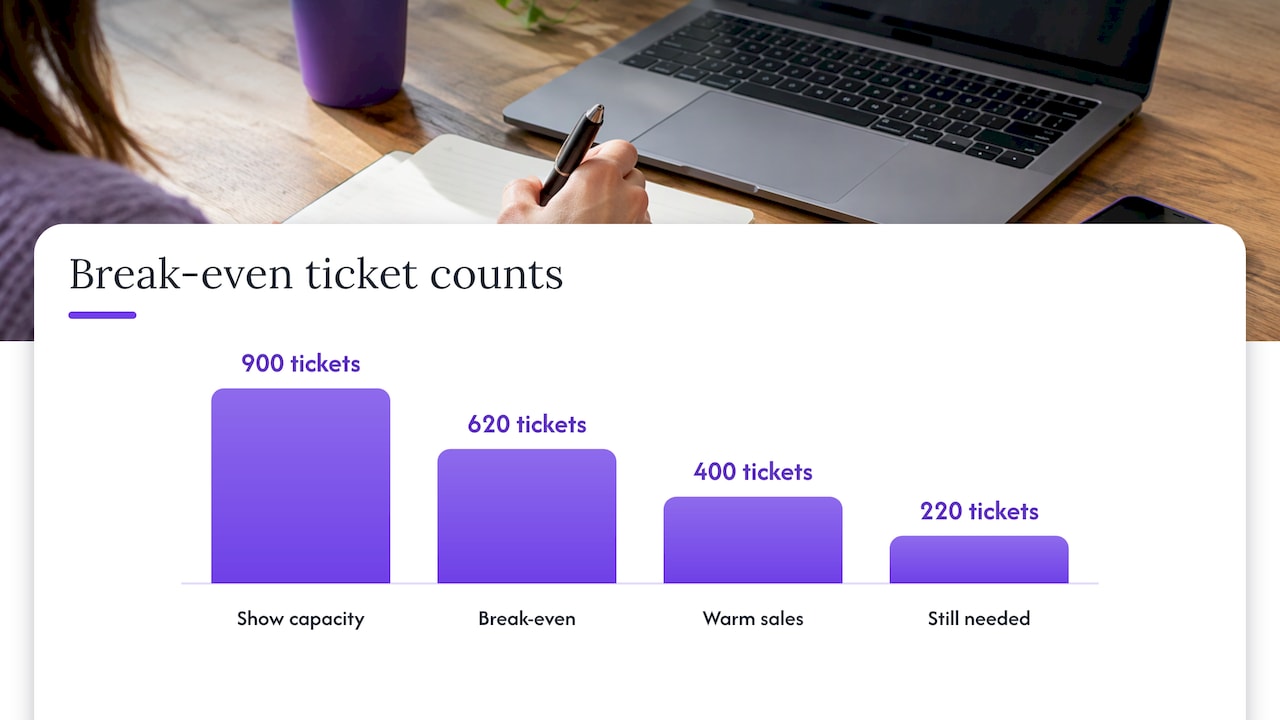
Hypothetical example: a show has a break-even of 620 tickets out of 900. You have sold 400 to warm audiences. You need 220 more to cover costs, and your remaining marketing budget is £2,200. That is £10 per ticket as a hard ceiling for break-even, and you will want to land well below that to make a profit. If your lookalike ad set is costing £14 per ticket after two weeks, the audience is not the only suspect: check the price, the creative and the landing page before you scale or switch off.
Our tour break-even calculator lets you model costs, ticket prices, revenue and break-even, so you can set that ceiling before the campaign starts.
Test one thing at a time
- Keep budget, creative and location the same when comparing audience sizes.
- Run each test long enough to collect a meaningful number of purchases, not a day or two of data.
- Change creative every few weeks during a long sales period, and note which audience saw which version.
- Record each result against the show, so the next on-sale starts with evidence instead of guesses.
Public case studies can show what is possible, but your own data is the benchmark. Results from one festival or theatre do not transfer to your venue, genre or price point. Treat any quoted lift or cost reduction as a reason to test, not as a forecast.
Check the source of your sales
To judge a lookalike properly, you need to know which sales came from the ad. That depends on the Pixel or Conversions API recording purchases correctly, and on your ticketing page passing the event through. If purchase events are missing or duplicated, every number above is wrong. Our ticketing analytics guide lists what to track, and the sales pacing forecast article shows how to compare actual sales against a planned curve.
Common mistakes to avoid
- Building from too few buyers. Under 100 matched people the audience cannot be created at all. At a few hundred, expect noisy results.
- Mixing genres in one source. Split lists by event type.
- Skipping the exclusion. Existing buyers should not see prospecting ads.
- Going nationwide for a local show. Narrow the ad set to the area around the venue.
- Judging by clicks. Judge by cost per ticket and return on ad spend.
- Uploading without consent records. Check the lawful basis and your privacy notice first.
- Leaving Advantage+ on by accident. Decide whether you want Meta to expand beyond your lookalike.
Ticketing that feeds your audiences
Lookalike audiences are only as good as the buyer data behind them. With Lookport Ticketing, you sell tickets with a 6% Lookport commission and no other Lookport charges, and ticket proceeds go directly into your own Stripe account. Availability follows Stripe-supported countries. You can see the commission on the pricing page.
Our campaign and customer data tools are described on the Lookport features pages, so you can check what is live before you plan around it. Your next step: open the tour break-even calculator, enter your costs and ticket price, and note the marketing ceiling per ticket before you build your first lookalike.
FAQ
What is a lookalike audience for events?
It is a group of people Meta selects because they resemble a source list you supply, such as past ticket buyers. You then show your event ads to that group. It is mainly a tool for reaching new people who are likely to be interested in similar shows.
How many ticket buyers do I need to build one?
Meta needs at least 100 matched people in the source, and recommends 1,000 to 5,000 for reliable results, per Shopify UK. If you have fewer, build from a Pixel purchase event over a longer period, or combine buyers from several similar events of the same genre.
Which percentage should I choose for a concert?
Start at 1%, which is the closest match to your source. Widen to a higher percentage only if delivery stalls or frequency rises quickly. Pair it with location targeting around your venue, because a percentage of the whole UK includes many people who will not travel to your show.
Can I upload my ticket-buyer list to Meta?
Only if you have a lawful basis and your privacy notice covers it. The ICO notes that consent needs consideration where data use is unexpected or intrusive, and PECR commonly requires consent for marketing messages and tracking. Check your records, remove opt-outs, and seek advice from a data-protection adviser if unsure.
Sources
- SocialRails: Facebook Lookalike Audiences guide
- Shopify UK: How to use lookalike audiences to target your ads
- ICO: When is consent appropriate?
- IAB UK: Digital advertising guidance on legitimate interests assessments
- IAB UK: Special category data guidance
Recommended
Ticketing & event budgeting
 2026-11-14
Concert Sales Curve: How UK Tickets Sell and How to Plan for It
Learn what a concert sales curve shows, how UK tickets typically sell from on-sale to show day, and how to check your pace against break-even.
 2026-11-13
Own Your Ticketing Data: A UK Promoter's Guide
What owning your ticketing data means under UK GDPR, which buyer data to keep, and how to set up referral tracking and marketing consent so it works for you.
 2026-11-12
Anti-Bot Ticketing: How UK Promoters Protect an On-Sale
How anti-bot ticketing works, what the UK ban on ticket bots means for promoters, and how to layer defences without blocking genuine fans at your on-sale.
 2026-11-11
GDPR for Event Marketing: A UK Promoter's Guide
How UK GDPR and PECR apply to event marketing: lawful basis, email and SMS consent, ticket-buyer privacy notices, retention and choosing CRM software.
 2026-11-10
Geo-Targeting Concert Ads: A UK Promoter's Guide
How to set up geo-targeted concert ads in the UK: choose radius, split tour dates by city, track ticket sales and stay within PECR consent rules.
 2026-11-09
Drip Pricing Rules in the UK: What Ticket Sellers Must Show
UK drip pricing rules for ticket sellers: which fees go in the headline price, how VAT on booking fees works, fines, and a checklist for promoters.