LOOKPORT / TICKETING & EVENT BUDGETING
Stripe Payouts in the UK: Timing, Instant Payouts and Cash Flow for Promoters
How Stripe payouts work for UK event organisers: first payout wait, schedules, Instant Payout fees and limits, and how to plan show cash flow around them.

Stripe pays ticket money into the UK bank account you add in the Dashboard, on a schedule you can change. Your first payout usually takes 7 to 14 days after the first live payment. Instant Payouts exist for UK users, but new accounts are not immediately eligible, and they carry a fee and limits. If you sell tickets for a concert or tour, the practical job is to plan your deposits and supplier bills around these timings.
This guide covers how to set up payouts, what to expect from the first one, how Instant Payouts work, what to check when money is late, and how to build all of it into a show budget.
TL;DR
- Add a UK bank account in the Dashboard under Payout settings. Its currency must match your payout settings currency.
- The first payout typically arrives 7 to 14 days after your first live payment. Do not plan a deposit around it.
- UK Instant Payouts run from £0.40 to £9,999 per payout, up to 10 a day, and the fee is deducted from the balance.
- With Lookport Ticketing, proceeds go straight into your own Stripe account, so these Stripe rules govern when you are paid.
- Model the timing in your budget before you put tickets on sale.
Table of Contents
- How Stripe pays out to a UK bank account
- Your first Stripe payout: what to expect
- Standard payout schedules and business days
- Stripe Instant Payouts in the UK
- If a payout is late: what to check
- Where Lookport fits: your money, your Stripe account
- Build payout timing into your show budget
- A payout checklist before you go on sale
- FAQ
- Next step
- Sources
How Stripe pays out to a UK bank account
Stripe sends your balance to a bank account you register. According to Stripe’s payouts documentation, you add or update that account in the Dashboard under Payout settings, and the account currency must match your payout settings currency. For a UK promoter that normally means a GBP business account.
You then have two ways to receive funds:
- Automatic payouts. Stripe sends money on the schedule you choose.
- Manual payouts. You turn automatic payouts off and request each payout yourself.
Most organisers are best served by automatic payouts. Manual payouts suit a promoter who wants to hold ticket money until a specific settlement date, such as the day an artist fee falls due.
Stripe also supports non-standard bank accounts, including virtual bank accounts from some digital money services. The same documentation notes these may see higher payout failure rates. For show revenue, use a conventional business current account in the name of your company. A failed payout in the week before a show is a problem you can avoid.
Your first Stripe payout: what to expect
After you receive your first live payment, Stripe typically schedules the first payout to complete within 7 to 14 days. The exact wait depends on your industry, country of operation and risk level.
For event organisers this matters more than for most businesses. Ticket revenue arrives in a rush on announcement day, and you may have a deposit due soon after. Treat the first payout as a delay you cannot shorten.
Practical steps:
- Open your Stripe account and finish verification before you announce. Do not wait for the first sale to find out what Stripe still needs from you.
- Run a small live test sale well before the on-sale date, so your first payout clock starts early. Refund it afterwards, and use a real card you control.
- Do not tie a deposit to first-week sales. Fund early commitments from your own cash or a deposit arrangement, and treat ticket money as later cash.
- Check the Dashboard. Stripe shows your payouts and their expected deposit dates, so you can see when money is due.
Standard payout schedules and business days
After the first payout, funds follow your account’s payout schedule. You can change the schedule at any time in the Dashboard. Stripe’s payout schedules FAQ describes daily as the default where supported, with weekly and monthly options too.
Two details affect event cash flow:
- Weekends and holidays. A payout scheduled for a non-business day arrives the next business day. A big Saturday on-sale will not reach your bank until the working week.
- Your bank’s own handling. The time funds become available depends on your settlement timing, and your bank may take extra time after receiving them.
If you take manual payouts in GBP, Stripe’s documentation says a payout initiated before 17:00 Europe/London is eligible for same-day delivery, provided your business is on standard T+3 settlement timing or slower. Otherwise, UK manual payouts typically arrive within 2 working days.
Which schedule suits a promoter
| Situation | Sensible schedule | Why |
|---|---|---|
| Single show, deposit due near on-sale | Daily automatic | Money reaches you as early as the rules allow |
| Tour with many dates and a finance team | Weekly automatic | One predictable weekly figure to reconcile |
| Money held until artist settlement | Manual | You choose when each payout leaves Stripe |
These are general planning options, not Lookport features. Pick the one your accountant can reconcile against ticket sales reports without extra work.
Stripe Instant Payouts in the UK
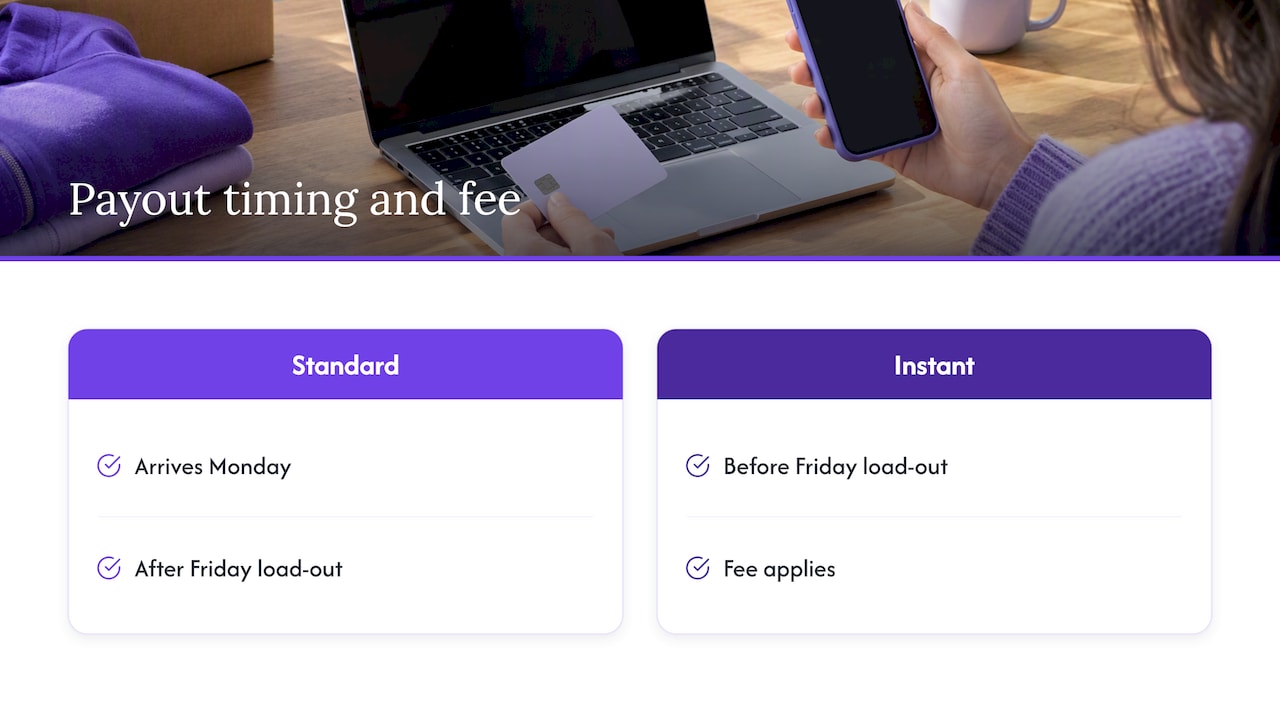
UK Stripe users can use Instant Payouts to send funds to a supported debit card or bank account. Funds usually appear within 30 minutes, 24 hours a day, unlike standard payouts, which follow your schedule.
Three things to know before you rely on them:
- New accounts are not immediately eligible. Check your eligibility and available instant balance in the Dashboard.
- There is a fee. It is pre-deducted from the balance.
- There are limits. In the UK each Instant Payout must be at least £0.40 and at most £9,999, with a maximum of 10 payouts per day. Daily volume limits show in the Dashboard.
So the most you can send in one day by Instant Payout is capped per payout and by count, and also by your daily volume limit. A promoter with £60,000 in ticket balance cannot move it all this way in one afternoon.
How to request an Instant Payout
The steps in the Stripe Dashboard are short:
- Log in and open the Payouts tab on the Balances page.
- Select the option to pay out funds instantly.
- Enter the amount.
- Choose the debit card or bank account that is eligible.
- Confirm.
If the option does not appear, your account is probably not yet eligible, or the balance is not available instantly. Check the eligibility notice in the Dashboard before contacting Stripe support.
When Instant Payouts earn their fee
An Instant Payout is a cost, so use it for a specific gap. A hypothetical example: a PA hire company wants payment before it loads out on Friday, and your standard payout lands on Monday. Moving a few thousand pounds early can be worth the fee. It is not worth paying on every payout as a habit. Read the current fee in your Dashboard before you press the button, since Stripe sets and can change it.
If a payout is late: what to check
Start in the Dashboard, where Stripe lists each payout and its expected deposit date. Then work through this list:
- Is it a weekend or bank holiday? The payout moves to the next business day.
- Is it your first payout? The 7 to 14 day window applies.
- Does the bank account currency match your payout settings currency?
- Is the bank account valid and in the right name? A failed payout points back to the account details.
- Does Stripe need more information from you? Look for verification requests in the Dashboard.
- Is your bank slow to credit? Funds can take extra time after Stripe sends them.
If none of these explains it, contact Stripe support with the payout ID. Do not tell a supplier a date you cannot see in the Dashboard.
Where Lookport fits: your money, your Stripe account
With Lookport Ticketing, ticket proceeds are paid directly into your own Stripe account. Lookport charges 6% commission and no other Lookport charges. Stripe’s own payment processing fees come from Stripe, so check its current UK pricing as part of your budget. Availability follows Stripe-supported countries.
Because the money sits in your account, you set the bank account and payout schedule yourself in Stripe. You can read how this works in practice in our guide to Stripe ticketing for UK events, and the Stripe payments feature page explains the set-up.
If you want to sell tickets with a flat 6% commission and direct payouts to your own account, see Lookport Ticketing or the pricing page.
Build payout timing into your show budget
The payout rules matter because they move cash, not profit. A show can break even on paper and still run short in the weeks before it, because your costs fall due before the ticket money arrives.
Here is a hypothetical example, labelled as such, with round numbers:
| Item | Amount |
|---|---|
| Tickets sold | 500 |
| Ticket price | £25 |
| Gross ticket revenue | £12,500 |
| Lookport commission at 6% | £750 |
| Revenue before Stripe fees and tax | £11,750 |
The Stripe processing fee is left out of the table because it depends on your Stripe pricing and the cards used. Add it in your own model. VAT and other costs also come off before you know profit. The UK all-in ticket pricing guide covers how fees show to buyers.
Now add timing. If the artist deposit is due at announcement and your first payout takes up to 14 days after the first sale, you need cash on hand for that period. Build a simple three-line cash plan:
- Committed before on-sale: deposits, venue hire, marketing spend.
- Expected in first two weeks: assume nothing from payouts until you see the Dashboard date.
- Due before the show: production, crew, hospitality, settlement.
Put the dates beside each line. Our ticket sales break-even analysis shows how many tickets you need to cover costs. Our guide on concert promoter profit margins shows how those costs fit into a P&L. To model costs, ticket prices, revenue and break-even for a show or tour, use the concert profit and tour budget calculator. Run it at three sell-through levels, such as 60%, 80% and 100%, so you see the cash gap at each.
Refunds, cancellations and payout balance
Refunds come out of your Stripe balance. If you pay out everything and then need to refund a cancelled date, you must fund the refunds another way. For a tour, keep a reserve in Stripe until you are confident each date will go ahead. Your reserve size is a budget decision: set it from your refund exposure, not a guess.
A payout checklist before you go on sale
- Stripe account verified, with a UK business bank account added.
- Bank account currency matches payout settings currency.
- Payout schedule chosen and agreed with whoever reconciles your accounts.
- A test payment made early, so you know the first payout date.
- Instant Payout eligibility checked, not assumed.
- Deposits funded from cash, not from ticket money.
- Break-even and cash plan run in the calculator at three sell-through levels.
FAQ
How do I get money from Stripe to my UK bank account?
Add your bank account in the Dashboard under Payout settings, making sure its currency matches your payout settings currency. Then use automatic payouts on a schedule, or turn them off and request manual payouts. Stripe lists each payout and its expected date in the Dashboard.
How long does the first Stripe payout take in the UK?
Stripe typically schedules the first payout to arrive within 7 to 14 days after your first live payment. The exact time depends on your industry, country and risk level. Plan show deposits so they do not depend on it.
Can I use Stripe Instant Payouts in the UK?
Yes, UK users can use them to send funds to a supported debit card or bank account, usually within 30 minutes. New accounts are not immediately eligible, so check the Dashboard. Each payout must be between £0.40 and £9,999, with up to 10 a day, and a fee is deducted.
Does Lookport hold my ticket money?
No. Ticket proceeds are paid directly into your own Stripe account. Lookport charges 6% commission and no other Lookport charges. Payout timing is set by Stripe and your own payout settings.
Next step
Before you put a show on sale, run your costs, ticket prices and sell-through through the tour break-even calculator, then set up Lookport Ticketing with your own Stripe account.
Sources
- Receive payouts, Stripe Documentation
- Instant Payouts for Stripe Dashboard users, Stripe Documentation
Recommended
Ticketing & event budgeting
 2026-11-04
Accessible Tickets Policy for UK Events: What to Include
How to write an accessible tickets policy for UK shows: legal duties, companion tickets, pricing, evidence checks and booking information, with sources.
 2026-11-03
Abandoned Cart Recovery for Events: A UK Promoter's Guide
How UK promoters can cut ticket checkout drop-off and win back buyers: fixing fees, timing reminders, staying within PECR and measuring recovered revenue.
 2026-11-02
AI Ticket Sales Forecasting for UK Concerts: A Practical Guide
How UK promoters can forecast concert ticket sales with AI: the data to gather, a simple workflow, how to check the forecast and how to turn it into a budget.
 2026-11-01
Pricing by Venue Size: How to Set Ticket Prices for Any Capacity
Set ticket prices by venue size: break-even price per capacity, tier splits, a price floor and UK all-in pricing rules, with worked examples in pounds.
 2026-10-31
Group Ticket Strategy: Offers and Waitlists That Fill Seats
How UK promoters can design group ticket offers and run an event waitlist that fills seats without cutting full-price sales, with worked numbers and legal checks.
 2026-10-29
Post-Event Marketing for Promoters: A 30-Day Plan
A practical post-event marketing plan for UK concert promoters: what to send in the first 48 hours, which KPIs to track and how to link follow-up to sales.