LOOKPORT / TICKETING & EVENT BUDGETING
Abandoned Cart Recovery for Events: A UK Promoter's Guide
How UK promoters can cut ticket checkout drop-off and win back buyers: fixing fees, timing reminders, staying within PECR and measuring recovered revenue.

Abandoned cart recovery for events means two jobs: fix the reasons buyers leave your ticket checkout, then follow up with the people who still left. Do the first job before the second. Fee surprises, long forms and unclear totals cause most of the avoidable drop-off, and a reminder email cannot repair them. This guide covers where buyers drop out, how to build a short reminder sequence, what UK privacy rules allow, and how to measure recovered sales against your break-even point.
TL;DR
- Show the full price, including booking fees, from the first screen. UK research shows hidden fees damage trust, and the UK government has said it will require unavoidable mandatory fees to be in the headline price.
- Cut the checkout to the fields you need to deliver the ticket, offer guest checkout and show an accurate total before payment.
- Send a short reminder sequence (for example 1 hour, 1 day and 3 days) and adjust it using your own open, click and purchase data.
- Email or text only people you are allowed to contact under PECR, and give a clear opt-out in every message.
- Track recovered revenue as its own line and feed it into your break-even model, so you know how many recovered tickets a show needs.
Table of Contents
- Why ticket buyers abandon checkout
- Fix the checkout before you chase buyers
- What counts as an abandoned ticket basket
- Build a reminder sequence that helps rather than pushes
- UK rules for tracking and contacting buyers
- Measure what recovery actually adds
- Where AI methods fit, and where they do not
- How Lookport Ticketing helps
- A five-step plan for your next on-sale
- FAQ
- Next step
- Sources
Why ticket buyers abandon checkout
Ticket buyers leave for different reasons from shoppers buying a pair of trainers. A ticket is a commitment to a future date, often with friends, and it cannot be returned to a shelf. Baymard’s event ticketing research describes experience shopping as confidence-driven, and says it should be designed for high anxiety and hesitation. Buyers worry about the wrong seat, the wrong date and the wrong total.
In practice, the drop-out points for a concert or tour date usually look like this:
- The price changes late. The ticket looks like one price on the event page and another at payment.
- The form asks too much. Account creation, optional fields and repeated address entry slow people down.
- The buyer is unsure. They cannot see the running time, the venue access details or the refund terms.
- Payment friction. The buyer’s preferred method is missing, or an error message does not explain what went wrong.
- Life gets in the way. A friend has not confirmed, or payday is next week. This is the group a reminder can actually win back.
Only the last reason is truly recoverable by messaging. The first four are checkout design problems, and fixing them lifts every visitor, not only the ones you email.
Hidden fees are the biggest trust risk
Which?'s UK research, published on 13 October 2023, found that 86% of consumers viewed drip pricing as sneaky, while 81% found added fees more acceptable when shown upfront and 69% when clearly explained. Fees themselves are tolerated better than surprises.
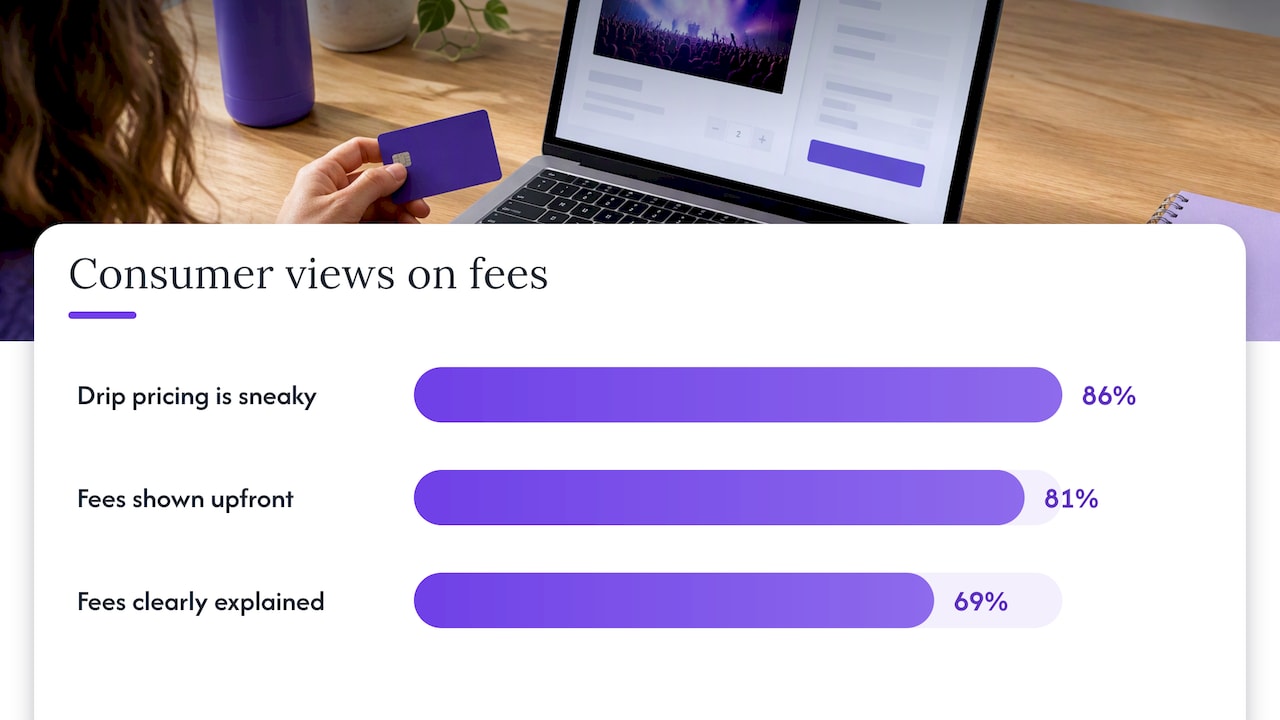
The regulatory direction points the same way. On 24 January 2024 the Department for Business and Trade said proposed measures would require unavoidable mandatory fees, including booking fees, to be in the headline price or shown at the start of shopping. Government research also found dripped fees at 46% of 525 online and mobile app providers. If your fee only appears on the last screen, you risk both lost sales and compliance problems.
We cover the pricing side in more detail in our guides to all-in ticket pricing and ticket fee strategy. The short version: decide what the buyer pays in total, show that number early and keep it the same to the last click.
Fix the checkout before you chase buyers
A recovery email brings a buyer back to the same checkout that lost them. If the checkout is the problem, you only pay to lose them twice. Stripe’s UK guidance, published 3 July 2025, recommends clear labels, logical field grouping, sensible defaults and asking only for information needed to fulfil the order. It also advises an accurate order summary, guest checkout, familiar payment methods and clear error messages with support and policy links.
Applied to a gig or tour date, that gives you this checklist:
- One total, early. Ticket price, booking fee and any delivery charge combined, visible before the buyer picks a quantity.
- Guest checkout. Let people buy without creating an account. Arts Professional’s UK audience research recommends clear sign-in and sign-up choices and non-blaming password recovery.
- Only necessary fields. Name and email are usually enough to issue a ticket. Ask for marketing preferences separately, with an unticked box.
- Practical venue information. The same research points to running times, transport, parking and step-free access as things buyers look for before committing.
- Relevant add-ons only. Cross-sells should help the buyer, not distract them. A parking pass for a venue with limited transport makes sense. Five unrelated offers do not. If you sell merchandise, event merchandise ideas can help you choose items worth showing after the ticket is secured rather than before.
- Familiar payment methods. Cards and wallets your audience already uses.
Your event page matters as much as the checkout. Buyers who arrive confused rarely start checkout at all, and we have a practical checklist for event landing pages for concert promoters.
What counts as an abandoned ticket basket
Before you design a sequence, define the event you are tracking. For ticketing, a useful definition has three parts:
- The visitor chose a ticket type and quantity.
- They entered an email address (or are a known customer logged in).
- They did not complete payment within a set window, for example 30 to 60 minutes.
Without an email address, you cannot send a reminder, and you should not try to identify the person by other means. Those visitors are best served by retargeting audiences built within your consent rules, or by fixing the page. Keep a separate count of them anyway, because they show you where the funnel leaks.
If your tickets are held for a limited time, note it. A held seat that is released after 10 minutes changes what a reminder can offer. Never imply a hold exists when it does not.
Build a reminder sequence that helps rather than pushes
Shopify UK’s abandoned-cart guidance recommends a three-message sequence at about 1 hour, 1 day and 3 days, refined using open, click and conversion data. That is written for online retail, so treat it as a starting test plan for events, not a rule. A ticket for a show next week behaves differently from one for a festival in nine months.
A sensible starting structure:
| Message | Timing | Purpose | What to include |
|---|---|---|---|
| 1 | About 1 hour | Simple nudge | Event name, date, venue, ticket type, link back to the basket |
| 2 | About 1 day | Answer doubts | Total price including fees, venue access and timing, refund or transfer terms, support contact |
| 3 | About 3 days | Final prompt | Only real changes: low availability, ticket phase closing, a date change |
Keep each message to one job and one link. The content should name the event, give a clear route back and carry useful, accurate information. Urgency belongs only where something is genuinely changing. If a price tier ends on a stated date, say so. If it does not, say nothing.
What a good message looks like
This is a hypothetical example for illustration, not a real campaign or result:
Subject: Your tickets for [Artist], [Venue]
You left two Standard tickets in your basket. The total is £X, including all fees. Doors open at [time]; the venue has step-free access at [entrance]. Your selection is here: [link]. If you had a problem paying, reply to this email and we will help.
It names the event, shows the full price, answers practical questions and offers help. It does not invent scarcity.
Channels
Email is the default because buyers have given you their address in the flow. SMS or social retargeting can add reach, but each carries consent requirements and a higher risk of irritating buyers. Start with email, prove the sequence works, then test one more channel at a time.
UK rules for tracking and contacting buyers
This part needs care. Check your set-up with a data protection adviser if you are unsure, and read the ICO guidance directly.
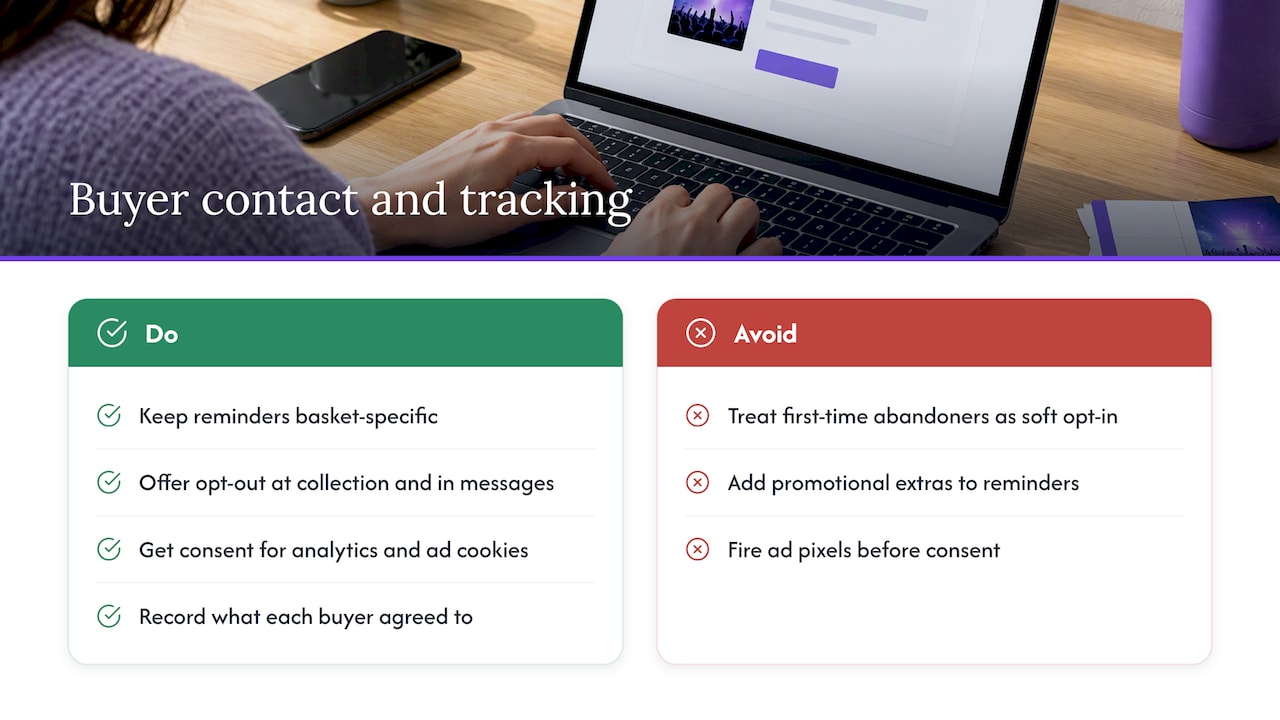
Marketing messages. The ICO states that you must not send marketing emails or texts to individuals without specific consent, with a limited exception for your own previous customers known as the soft opt-in. The soft opt-in relies on a recent purchase, so a first-time visitor who abandoned a basket has not yet bought from you. Whether a particular reminder counts as marketing or as a service message tied to a transaction the person started depends on its content and your set-up. Get advice on your own flow, and keep reminders strictly about the basket the person created, without promotional extras.
Opt-out. The same ICO guidance says you must give a clear chance to opt out when you first collect details and in every message you send. Build an unsubscribe link into all three reminders.
Cookies. Cookies strictly necessary to provide a service the user asked for, such as shopping-cart cookies, are exempt from consent. Analytics and advertising cookies are different and need a consent route. If you use ad pixels to retarget people, check what fires before and after consent. Our note on Meta Pixel events walks through three checks before you promote a concert.
Keep a record of what each buyer agreed to and when. It makes suppression, unsubscribes and data requests much simpler.
Measure what recovery actually adds
A recovery programme is only worth running if you can see what it adds to the show’s budget. Measure these figures per event:
- Baskets started. Visitors who chose tickets and gave an email address.
- Baskets completed without a reminder. Many buyers return on their own, so do not credit your emails for those.
- Baskets completed after a reminder. Count a purchase only if it follows a click on the reminder or occurs within a set window after it, and state the window you used.
- Recovered revenue. Ticket revenue from group 3, net of refunds.
- Cost of recovery. Tool cost, staff time and any discount you gave.
The cleanest test is a holdout: leave a random 10% to 20% of abandoners without reminders and compare their purchase rate with the rest. The difference is what your sequence adds. Without a holdout, you cannot separate recovered sales from sales that would have happened anyway.
Dotdigital’s case study reports that data integration between marketing and ticketing platforms enabled personalised, timely reminders, and cites Cardiff City FC’s 12.5x recovery ROI. It is one company’s account of one club and not a benchmark for your show. Use it as a reason to connect your ticketing and email data, not as a target.
A hypothetical break-even example
The numbers below are invented to show the method. They are not Lookport results or a forecast.
- Venue capacity: 1,200. Average ticket price: £30. Ticket revenue at sell-out: £36,000.
- Total show costs: £27,000. At £30 a ticket, break-even is 900 tickets.
- Assume 300 baskets are abandoned with a known email. If a holdout test shows reminders add 20 completed purchases of one ticket each, that is 20 tickets, or £600 of revenue.
Twenty tickets is 2.2% of the 900 you need to break even. That is useful but not decisive. If the same test shows the sequence adds nothing, you have learned that your effort is better spent on the checkout, the price display or the event page. Either answer is good information.
To run this with your own figures, use the tour break-even calculator. Enter costs, ticket prices and capacity, then add a scenario where recovery adds a modest number of tickets and see how far it moves the break-even point.
Where AI methods fit, and where they do not
General AI methods can help with abandonment analysis. A model can group baskets by ticket type, days to show and traffic source, then flag where drop-off is highest. It can suggest which reminder timing performs better once you have enough data.
Treat that as a method, not a promise. It needs consistent data, a validation step (compare predictions against a period the model has not seen) and a human check on every message before it goes out. Small events with few baskets rarely produce enough data for reliable conclusions, so start with simple counts and a holdout test. For Lookport’s documented AI features, see the AI for event ticketing page.
How Lookport Ticketing helps
Lookport Ticketing is built for concert promoters, event organisers and venues. We charge a 6% commission with no other Lookport charges, and ticket proceeds go directly into your own Stripe account. That makes the all-in price easier to plan, because you know what our share is before you set your ticket price. Availability follows Stripe-supported countries. You can see the details on our pricing page, and our guide to ticketing fees explained shows how to model them.
If you sell online and in a hybrid format, see our online and hybrid ticketing page. For how payments and tax are handled with Stripe in the UK, read our guide to Stripe ticketing for UK events. To see the whole product, visit Lookport Ticketing.
A five-step plan for your next on-sale
- Audit the checkout. Buy a ticket yourself on a phone. Note every extra field, every screen and the first place the full price appears.
- Show the total early. Move fees to the first price display.
- Define an abandoned basket and set up your count, including a holdout group.
- Write three short reminders with an unsubscribe link, and have someone responsible for data protection approve the consent basis.
- Review after the on-sale. Compare completed purchases between reminded and holdout groups, then update the break-even model.
FAQ
What is abandoned cart recovery for events?
It is the process of understanding why people start but do not finish a ticket purchase, then fixing those causes and following up with those you can lawfully contact. The fix comes first. Reminders only recover the buyers who were interrupted or undecided.
When should I send the first reminder?
A common starting point is about an hour after abandonment, followed by messages at around one day and three days. Shopify UK suggests refining the timings using open, click and conversion data. For a show only days away, compress the sequence and test it.
Can I email someone who left tickets in their basket?
It depends on consent and on what the message contains. The ICO says marketing emails and texts to individuals need specific consent, with a limited soft opt-in for previous customers. Take advice on your own set-up and always include an opt-out.
Should I offer a discount in the reminder?
Not as a default. Discounts teach buyers to abandon on purpose and reduce your margin per ticket. Start with helpful information, a clear total and a working link, then test any offer against your break-even figure.
How do I know if recovery is working?
Use a holdout group that receives no reminders and compare completed purchases. Credit the sequence only with the difference, and record the cost of running it.
Next step
Model your next show with the tour break-even calculator to see how many tickets you need, then add a recovery scenario to see how it changes your target.
Sources
- Stung by fees: How consumers are harmed by drip pricing, Which?
- Event Ticketing UX Research: 3 Key Takeaways, Baymard
- New laws set to ban mandatory hidden fees from online shopping, GOV.UK
- Estimating the prevalence and impact of drip pricing, GOV.UK
- Checkout screen best practices for high conversion, Stripe
- Should buying a ticket really be this hard? Arts Professional
- Abandoned Cart Emails: Best Practices and Examples, Shopify UK
- Use of cookies within Public Access, East Suffolk Council
- How Cardiff City FC scored a 12.5x ROI with cart recovery, Dotdigital
Recommended
Ticketing & event budgeting
 2026-11-04
Accessible Tickets Policy for UK Events: What to Include
How to write an accessible tickets policy for UK shows: legal duties, companion tickets, pricing, evidence checks and booking information, with sources.
 2026-11-02
AI Ticket Sales Forecasting for UK Concerts: A Practical Guide
How UK promoters can forecast concert ticket sales with AI: the data to gather, a simple workflow, how to check the forecast and how to turn it into a budget.
 2026-11-01
Pricing by Venue Size: How to Set Ticket Prices for Any Capacity
Set ticket prices by venue size: break-even price per capacity, tier splits, a price floor and UK all-in pricing rules, with worked examples in pounds.
 2026-10-31
Group Ticket Strategy: Offers and Waitlists That Fill Seats
How UK promoters can design group ticket offers and run an event waitlist that fills seats without cutting full-price sales, with worked numbers and legal checks.
 2026-10-29
Stripe Payouts in the UK: Timing, Instant Payouts and Cash Flow for Promoters
How Stripe payouts work for UK event organisers: first payout wait, schedules, Instant Payout fees and limits, and how to plan show cash flow around them.
 2026-10-29
Post-Event Marketing for Promoters: A 30-Day Plan
A practical post-event marketing plan for UK concert promoters: what to send in the first 48 hours, which KPIs to track and how to link follow-up to sales.